Which eBay sites and countries are supported
ProfitClerk reads orders from your eBay seller account on every eBay site you sell on, from eBay UK and US to Germany and Australia, and groups sales by site.
ProfitClerk works with your eBay seller account wherever you sell. It reads orders through eBay's own seller APIs, which cover every eBay site, so sales from eBay UK, eBay US, eBay Germany, eBay Australia and the other sites all come in through the one connection. Reports can then show your sales and profit for each site.
eBay sites ProfitClerk recognises
Each order remembers the eBay site its item was listed on. ProfitClerk names these sites in reports:
| Europe | Americas | Asia-Pacific |
|---|---|---|
| eBay UK | eBay US | eBay Australia |
| eBay Ireland | eBay Motors | eBay Hong Kong |
| eBay Germany | eBay Canada | eBay Singapore |
| eBay Austria | eBay Malaysia | |
| eBay Switzerland | eBay Philippines | |
| eBay France | eBay India | |
| eBay Italy | ||
| eBay Spain | ||
| eBay Netherlands | ||
| eBay Belgium | ||
| eBay Poland |
If eBay sends a site that is not in this list, ProfitClerk still brings the order in and shows the site as eBay names it.
One account, several sites
You do not connect each site separately. If your eBay account sells on several sites, for example through international visibility or listings on another eBay site, all those orders arrive through the same connection.
If you run separate eBay accounts, for example one per country, connect each of them. See Connect more than one eBay account.
See profit by eBay site
- Open Reports and choose Breakdowns.
- Choose Marketplace.
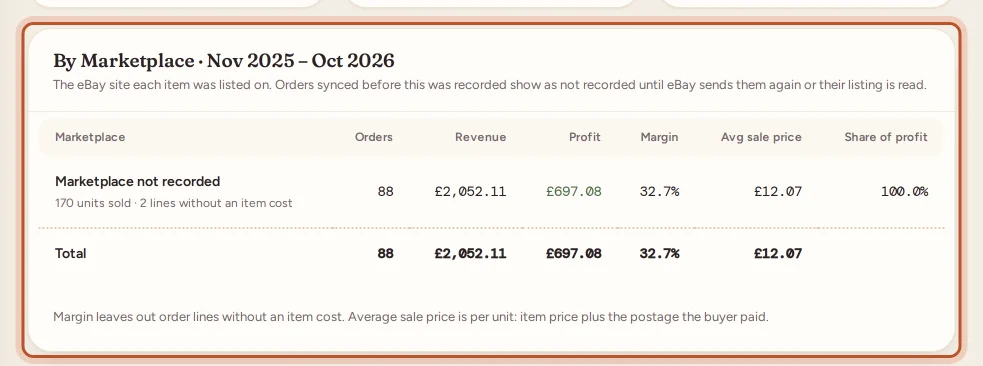
You see sales, profit and margin for each eBay site in the period. Orders that came in before the site was recorded are grouped as Marketplace not recorded. In the app, the same report is under Money › More reports › Breakdowns.
Currency
ProfitClerk uses the amounts eBay records for your account, including fees and refunds. It does not convert between currencies. In your country, currency and tax profile, choose the Reporting currency eBay pays you in, so every amount is labelled correctly.
Countries for tax figures
Profit, fees, stock and most reports work wherever you live. The tax side of ProfitClerk (VAT or GST on fees and sales, the tax centre's forms, thresholds and deadlines, mileage rates) depends on your Home country. The list includes the United Kingdom, Ireland, many EU countries, the United States, Canada, Australia and New Zealand; the exact list is in the tax profile. If yours is not there, choose Somewhere else (no VAT or GST figures).
Languages
The website and the app come in English, German, French, Italian, Spanish, Dutch, Polish and Chinese (Hong Kong), the languages of the main eBay sites.
Free fee calculators per site
The free eBay fee and profit calculators on the website (Free tools) have a version for each eBay site whose fees ProfitClerk keeps, such as eBay UK, eBay US and eBay Germany. They estimate fees before you list. Your real orders always use the fees eBay actually charged.
Questions people ask
I sell on eBay UK and eBay Germany from one account. Do I need two connections?
No. One eBay seller account is one connection, and ProfitClerk brings in its orders whichever eBay site the item was listed on.
Does ProfitClerk convert sales in other currencies?
No. It shows the amounts eBay records for your account, in the reporting currency you choose. Pick the currency eBay pays you in so the figures read correctly.
Why do some orders say Marketplace not recorded?
Orders brought in before ProfitClerk started recording the site show this until eBay sends them again or their listing is read on a later sync.
My country is not in the tax profile list. Can I still use ProfitClerk?
Yes. Choose Somewhere else. Profit, fees, stock and reports all work; only the VAT and GST figures are left out.
Thanks for telling us.