Disconnect an eBay account
Remove an eBay account from ProfitClerk in Settings or the app. Its past orders and profit stay in your reports; new orders stop coming in until you reconnect.
To disconnect an eBay account, open Settings, select Disconnect under the account and confirm. ProfitClerk deletes its access keys for that account and stops syncing it. Everything already brought in stays: past orders, fees, refunds and profit remain in your Overview, Orders and reports.
Only the workspace owner can disconnect an account.
Disconnect on the website
- Open Settings (Workspace & eBay tab).
- Under the account, select Disconnect.
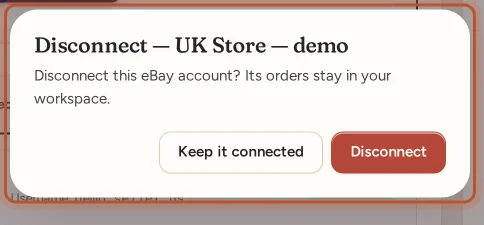
- A box asks "Disconnect this eBay account? Its orders stay in your workspace."
- Select Disconnect to go ahead, or Keep it connected to cancel.
You see "eBay account … disconnected. Existing orders were kept."
Disconnect in the app
- Go to More › eBay accounts and tap the account.
- Tap Disconnect.
- Confirm. The app reminds you: "Its orders stay in your reports. New orders from it stop coming in until you connect it again."
What happens to your data
| After disconnecting | |
|---|---|
| Orders already in ProfitClerk | Kept, with their fees, refunds, item costs and profit |
| Reports, tax figures and exports | Still include those orders |
| Stock and item costs | Unchanged; stock belongs to the workspace, not to an eBay account |
| New orders, fees and refunds | Stop coming in for that account |
| Late refunds on old orders | Not read from eBay any more |
| ProfitClerk's eBay access keys | Deleted for good |
| The account's place on your plan | Freed |
If you had several accounts and disconnect the active one, another account becomes active. Your other accounts keep syncing as normal.
Remove access on eBay's side too
Disconnecting deletes ProfitClerk's keys, so it can no longer reach your account. If you also want the app removed from eBay's own list of apps with access, use the third-party app permissions in your eBay account settings. Removing access only on eBay, without disconnecting here, makes the account show Error in ProfitClerk until you reconnect or disconnect it.
Connect the same account again later
Select Connect eBay (or Connect another account) and sign in to that eBay account. It appears as a fresh connection:
- Orders already in ProfitClerk are matched by their eBay order number, so they are not duplicated.
- The first sync brings in recent orders again, so the gap is filled.
- Give it its name again, and start its two-year import again if you need older history and your plan includes it.
If you are only fixing a sync problem, use Reconnect instead, which keeps everything as it is. See Reconnect eBay when sync stops working.
Leaving ProfitClerk altogether
Disconnecting eBay does not cancel your plan or delete your workspace.
- Cancel your plan on the Billing page or under More › Your plan. See Cancel your plan.
- Download your data before you go, from your profile on the website (Settings › Your profile) or More › Legal & privacy › Download my data in the app.
- Delete your account with Delete account in your profile on the website, or More › Delete account in the app. For the owner this deletes the workspace: orders, inventory, eBay connections and team. It cannot be undone.
See also eBay permissions and security.
Questions people ask
Will disconnecting delete my orders?
No. Orders already brought in stay in your workspace, with their fees, refunds, costs and profit, and keep counting in your reports.
Can I disconnect without an active plan?
Yes. Taking things away always works, even when your workspace is read-only without a plan.
Does disconnecting free a place on my plan?
Yes. The account no longer counts towards your plan's eBay accounts, so you can connect another one.
I only want to fix a sync problem. Should I disconnect?
No. Use Reconnect instead. It keeps the account's name and history import, and simply gives ProfitClerk a fresh sign-in.
How do I delete all my data, not only the eBay link?
Delete your account. For the owner this deletes the whole workspace, including orders, stock and team. It cannot be undone, so download your data first if you want a copy.
Thanks for telling us.