eBay permissions and security
ProfitClerk connects to eBay with read-only access: it reads orders, fees and listings, keeps its eBay keys encrypted, and can never change your listings.
ProfitClerk connects to eBay with read-only access. It reads your orders, financial transactions and listings so it can work out your profit, and nothing else. It cannot list, revise, end or reprice items, change your stock, message buyers or move money. You sign in on eBay's own page, so ProfitClerk never sees your eBay password, and the access keys eBay gives it are stored encrypted.
The permissions ProfitClerk asks for
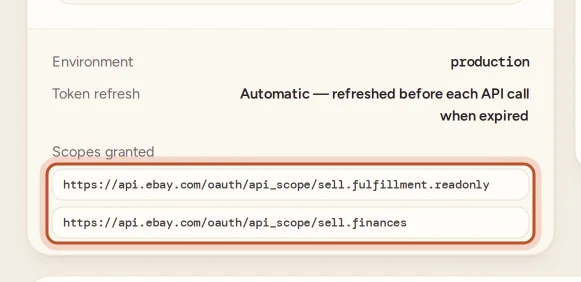
When you connect, eBay shows the permissions requested. There are two:
| Permission | What ProfitClerk uses it for |
|---|---|
Fulfillment, read-only (sell.fulfillment.readonly) |
Reading your orders: items, SKUs, prices, postage paid, the buyer's delivery details and cancellations |
Finances (sell.finances) |
Reading eBay's financial records: fees, refunds, label costs, ad fees and payouts |
eBay has no read-only version of the Finances permission, so it appears without "read-only". ProfitClerk only ever reads from it: the Finances side of eBay reports money movements; it is not a way to send money.
ProfitClerk also reads your listings (when items were listed, relisted, changed price or ended) through eBay's older listing service, which uses the same sign-in and needs no extra permission. It only uses the parts of that service that read.
The exact list is in Settings, in the eBay accounts card, under Scopes granted.

What ProfitClerk can never do
ProfitClerk is built so that it never asks eBay for permission to:
- create, revise, relist or end listings
- change prices or quantities
- manage your inventory on eBay
- contact buyers, leave feedback or handle returns on eBay
- move money or change payout settings
Even if a setting were changed by mistake, ProfitClerk drops any permission that is not read-only before it contacts eBay.
How your eBay keys are kept
- No password. eBay gives ProfitClerk an access key and a longer-lasting refresh key. Your eBay password stays with eBay.
- Encrypted at rest. Both keys are stored encrypted in the database and are never included in exports or shown on screen.
- Refreshed automatically. The short-lived access key is renewed before it expires, so you only need to sign in again when eBay ends the longer-lasting one. Settings shows when the current access key expires.
- Deleted on disconnect. Disconnecting an account deletes its keys for good.
Who in your team can do what
| Action | Owner | Manager | Viewer |
|---|---|---|---|
| Connect, reconnect or disconnect an eBay account | Yes | No | No |
| Rename an account or make it active | Yes | No | No |
| Sync now and re-import missed orders | Yes | Yes | No |
| Start the two-year import | Yes | Yes | No |
| See accounts, sync status and figures | Yes | Yes | Yes |
Buyers' data
Orders include the buyer's name and delivery address, which eBay provides so that sellers can post the item. ProfitClerk uses them for the Shipping page. When eBay tells ProfitClerk that an eBay user has closed their account, ProfitClerk removes that buyer's personal details from your orders, while keeping the figures.
Keep your ProfitClerk account safe
Anyone who signs in to your ProfitClerk account can see your sales and buyers' addresses, though not change anything on eBay. Protect it:
- Use a strong password you do not use elsewhere.
- Turn on two-step sign-in. See Two-step sign-in.
- Give team members the lowest role they need.
Stop ProfitClerk reading your eBay account
- In Settings, select Disconnect under the account, and confirm. ProfitClerk deletes its keys and stops syncing that account. See Disconnect an eBay account.
- If you also want to remove the app's access on eBay's side, use the third-party app permissions in your eBay account settings.
Questions people ask
Can ProfitClerk list, end or reprice my items?
No. It never asks eBay for permission to manage listings or stock, so eBay would refuse any such request even if one were made.
Why does eBay list a Finances permission that is not marked read-only?
eBay publishes no read-only version of its Finances permission. ProfitClerk asks for it to read fees, refunds and payouts, and only ever reads from it.
Does ProfitClerk store my eBay password?
No. You sign in on eBay's own page. ProfitClerk receives an access key from eBay, which it stores encrypted.
Can my team members connect or change eBay accounts?
No. Only the workspace owner can connect, reconnect or disconnect eBay accounts. Managers can sync and start the history import; viewers can only look.
How do I stop ProfitClerk reading my eBay data?
Disconnect the account in Settings. That deletes ProfitClerk's eBay keys for it. You can also remove the app's access from your eBay account settings.
Thanks for telling us.