Two-step sign-in with an authenticator app
Protect your ProfitClerk account with two-step sign-in: link an authenticator app, save your recovery codes, and sign in with a 6-digit code after your password.
Two-step sign-in adds a second check when you sign in: after your password, you enter a 6-digit code from an authenticator app on your phone. Someone who learns your password still cannot get in. You turn it on under Settings › Your profile › Sign-in and security on the website, or More › Security and sign-in in the app.
What you need
An authenticator app on your phone, for example Google Authenticator, Microsoft Authenticator, 1Password or Authy. Any app that makes 6-digit time-based codes works.
Turn it on on the website
- Open Settings and the Your profile tab (or select your name at the bottom of the sidebar).
- In Sign-in and security, find Two-step sign-in. It shows Off.
- Select Turn on two-step sign-in.
- Scan the QR code with your authenticator app. If you cannot scan it, type in the key shown under "Can't scan? Type in this key:".
- Type the 6-digit code the app shows and select Turn on.
- Your recovery codes appear. Save them now: select Download codes, or copy them into a password manager or print them. They are not shown again.
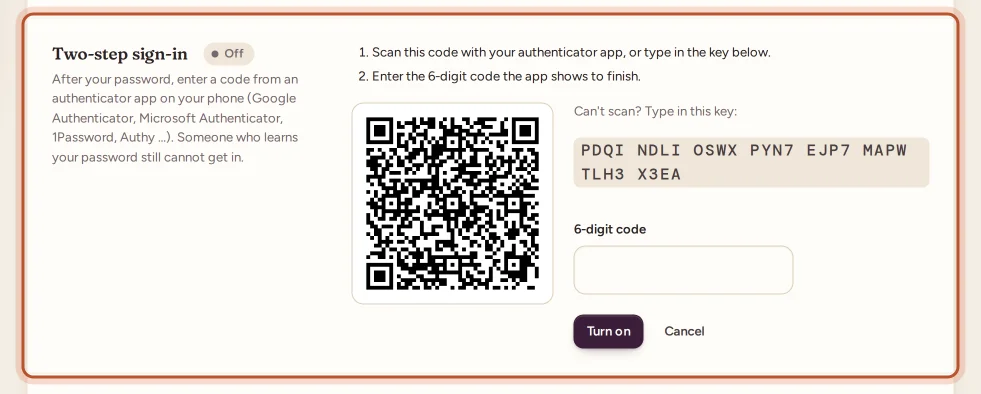
The section now shows On, the date it was turned on and how many recovery codes are left. If you change your mind during setup, select Cancel.
Turn it on in the app
- Open More › Security and sign-in.
- Tap Turn on two-step sign-in.
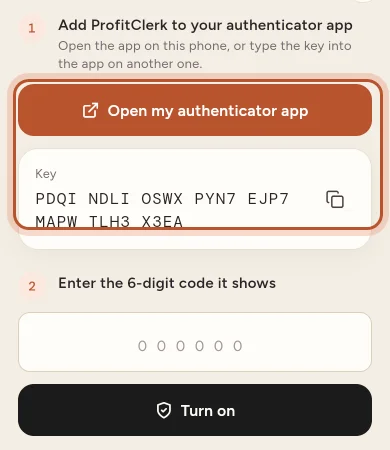
- Add ProfitClerk to your authenticator app: tap Open my authenticator app if it is on the same phone, or Copy the key and type it into the app on another device.
- Enter the 6-digit code it shows and tap Turn on.
- Save the recovery codes with Copy all codes, then tap I have saved them.
Signing in with two-step sign-in
- Sign in with your email and password, or with Google or Apple, as usual.
- On Two-step sign-in, enter the 6-digit code from your authenticator app.
- Select Sign in.
You have a few minutes to enter the code. If it takes too long you see "That took too long. Sign in again."
Recovery codes
You get 8 recovery codes. Each one signs you in once in place of an authenticator code, for when you lose or change your phone.
- To use one: on the code step, select Lost your phone? Use a recovery code, type a code and select Sign in. To go back, select Use a code from the app.
- To see how many are left: look in Sign-in and security (for example "6 recovery codes left").
- To make new ones: enter your current password next to New recovery codes and select it. The old codes stop working straight away.
New phone
Most authenticator apps can move their codes to a new phone. If yours cannot, sign in with a recovery code, turn two-step sign-in off, and turn it on again with the new phone.
Turn it off
On the website, type your current password next to Turn off in the Two-step sign-in section and select Turn off. In the app, tap Turn off and enter your password. Your sign-in history records the change.
Lost your phone and your recovery codes?
Use Contact us and choose Help with my account. Support can reset two-step sign-in after confirming it is really you. You can then sign in with your password alone and should turn it on again with your new phone. Your sign-in history shows "Two-step sign-in reset by support".
See also Sign-ins and sessions to check where your account is signed in.
Questions people ask
Which authenticator apps work?
Any app that makes 6-digit time-based codes, such as Google Authenticator, Microsoft Authenticator, 1Password or Authy.
I lost my phone. How do I sign in?
On the code step, choose "Lost your phone? Use a recovery code" and enter one of the recovery codes you saved. Each code works once. Then set up two-step sign-in again on your new phone.
My code is always wrong. Why?
Authenticator codes depend on the time. Make sure your phone sets its date and time automatically, and type the newest code before it changes.
Does two-step sign-in apply when I sign in with Google or Apple?
Yes. After Google or Apple confirms who you are, ProfitClerk still asks for the code from your authenticator app.
I lost my phone and my recovery codes. What now?
Contact us with Help with my account. Support can reset two-step sign-in once they have confirmed it is really you; you can then sign in with your password and turn it on again.
Can the workspace owner make teammates use two-step sign-in?
No. Each person turns it on for their own account in their profile.
Thanks for telling us.