Confirming your email address
How to confirm your email address after signing up to ProfitClerk, send the link again, fix a wrong address, and what to do if the email does not arrive.
When you sign up with your email, ProfitClerk may ask you to confirm your email address before you start. We send you an email with a link: open it, and you are in. Until then, the website and the app show a "confirm your email" page instead of your workspace.
If you sign up with Google or Apple, the address is already confirmed and there is nothing to do.
Confirm your email on the website
After signing up you see Verify your email: "We sent a link to [email]. Click it to start using ProfitClerk."
- Open the email from ProfitClerk and select the link.
- You see Email confirmed. "Thanks, your email address is confirmed."
- Carry on to your workspace.
The page also has:
- Resend Verification Email, which sends a new link ("We sent a new link to [email].")
- Wrong address? Change it, which opens your profile so you can correct the address
- Log out
Confirm your email in the app
The app shows Confirm your email: "We sent a link to [email]. Open it on this phone or on a computer, and you're in."
- Open the email on your phone or on a computer and tap the link.
- If you opened it on the phone, tap Back to the app on the page that opens.
- The app checks by itself every few seconds and carries on as soon as the address is confirmed. You can also tap I've confirmed it.
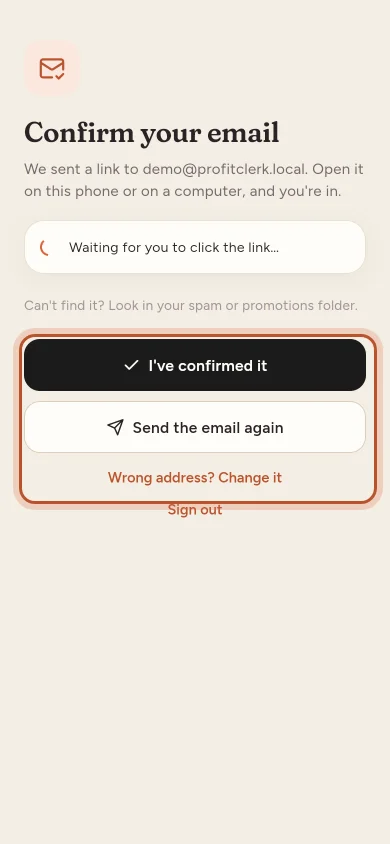
If you tap I've confirmed it too early, you see "Not confirmed yet. Open the link in the email first."
Send the link again or change the address
- Send the email again sends a new link. You can ask again after 60 seconds.
- Wrong address? Change it opens Change your email. Type the right address and tap Send the link here.
If the email does not arrive
- Look in your spam, junk or promotions folder: "Can't find it? Look in your spam or promotions folder."
- Check the address shown on the page. If it is wrong, change it as above.
- Send the link again and use the newest email. Links expire after a while (normally 60 minutes).
- Some work email systems hold messages from new senders for a few minutes. Wait a little before asking again.
Changing your email later
If you change your email address in Settings › Your profile, we send a confirmation link to the new address. Until you open it, the Profile information card says "Your email address is unverified." with a button to send the link again. See Your profile: name, email and password.
Opening a password reset link also confirms your address, because it proves the email reached you. See Forgot your password.
Still stuck?
Use the Contact us page (it works before your email is confirmed) and choose Help with my account. Tell us the address you signed up with.
Questions people ask
Why do I have to confirm my email?
It makes sure receipts, security alerts and password reset links reach you, and that nobody signed up with your address by mistake.
The link says it has expired. What now?
Ask for a new one with Resend Verification Email on the website or Send the email again in the app, and open the newest link.
Can I open the link on my computer if I signed up on my phone?
Yes. The link works on any device, signed in or not. The app notices within a few seconds and carries on by itself.
I signed up with Google or Apple. Do I need to confirm?
No. Google or Apple has already confirmed the address, so there is no confirmation email.
I typed the wrong address when I signed up. How do I fix it?
Choose "Wrong address? Change it", enter the right address, and the link is sent there instead.
Thanks for telling us.