Forgot your password? Reset it by email
Forgot your ProfitClerk password? Ask for a reset link on the sign-in page or in the app, open it within the hour and choose a new password to sign in again.
If you have forgotten your ProfitClerk password, select Forgot your password? on the sign-in page (website) or sign-in screen (app), enter the email address you signed up with, and open the link we email you. The link lets you choose a new password, and you can then sign in with it everywhere.
Reset your password on the website
- On the sign-in page, select Forgot your password?.
- Enter your email address and select Email Password Reset Link.
- The page confirms: "If there is an account for [email], we have emailed it a link to choose a new password." It also says how many minutes the link works.
- Open the email and select the link.
- On Choose a new password, type your new password twice and select Reset Password.
- You see Password changed. Sign in with the new password on the website or in the app.
Reset your password in the app
- On the sign-in screen, tap Forgot your password?. The email you typed so far is carried over.
- On Reset your password, check the email address and tap Send the link.
- You see Check your email. Open the link on the phone or on a computer.
- Choose a new password on the page that opens. On a phone, it offers Back to the app when you are done.
- Tap Back to sign in and sign in with the new password.
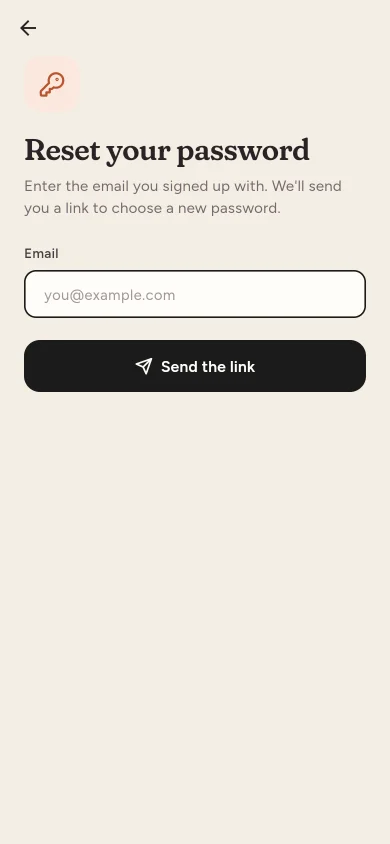
If you typed the wrong address, tap Use another email.
What happens after a reset
- Your new password works straight away on the website and in the app.
- The ProfitClerk app is signed out on every phone. Sign in again there with the new password.
- Two-step sign-in stays on. You still need the code from your authenticator app, or a recovery code. See Two-step sign-in.
- If your email address had not been confirmed yet, opening the reset link confirms it, as the link reached your inbox.
The new password must be at least 8 characters. Choose one you do not use anywhere else.
If the email does not arrive
- Wait a minute and look in your spam, junk or promotions folder.
- Check the address. For your privacy the page never says whether an account exists, so it looks the same if the address was mistyped. Try again with the address you signed up with.
- Do not ask too often. If you ask for several links in a short time you may see "Please wait before retrying." Wait a minute, then try again.
- Use the newest link. Only the most recent link works. An older one shows "This password reset token is invalid."
- Link expired? Ask for a new one.
If you sign in with Google or Apple
Accounts created with Continue with Google or Continue with Apple do not have a password you know. You do not need one to sign in with Google or Apple. If you want a password as well, for example to confirm deleting your account, use Forgot your password? with the same email address. See Sign in with Google or Apple.
Still cannot get in?
If you no longer have access to the email address on your account, use the Contact us page and choose Help with my account. Tell us the address you signed up with and your workspace name.
Questions people ask
How long does the reset link work?
The email says how long; normally 60 minutes. After that, ask for a new link from the sign-in page.
I did not get the email. What should I do?
Check your spam or promotions folder and make sure you typed the address you signed up with. For your privacy, the page says the same thing whether or not an account exists, so a typo is easy to miss.
Will I be signed out of the app after a reset?
Yes. Resetting the password signs out the app on every phone, so sign in again there with the new password.
Do I still need my two-step code after a reset?
Yes. A new password does not turn off two-step sign-in. If you have also lost your authenticator, use one of your recovery codes.
I sign up with Google. Can I set a password too?
Yes. Ask for a reset link with your Google address and choose a password. You can then sign in either way.
Thanks for telling us.