Downloading a copy of your data
Download a copy of your ProfitClerk account and workspace records as one JSON file from Settings › Your profile or More › Legal & privacy in the app.
You can download a copy of your ProfitClerk data at any time as one JSON file. On the website, open Settings › Your profile and select Download my data. In the app, open More › Legal & privacy and tap Download my data. If you are the workspace owner, the file includes the workspace's business records too.
Download on the website
- Open Settings and the Your profile tab (or select your name at the bottom of the sidebar).
- Scroll to Download my data: "Get a copy of your account, workspace and business records (orders, stock, expenses, mileage, returns and billing) as a JSON file."
- Select Download my data. Your browser saves a file named
data-export-followed by today's date.

For a large workspace the file can take a little while to download.
Download in the app
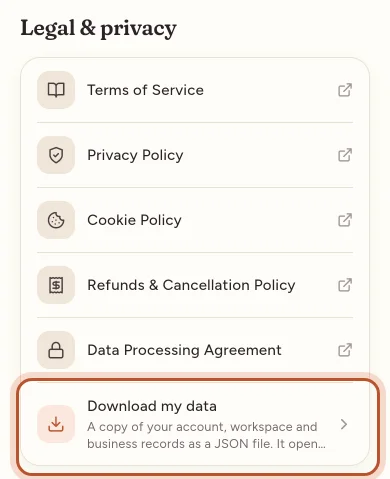
- Open More › Legal & privacy.
- Tap Download my data: "A copy of your account, workspace and business records as a JSON file. It opens in your browser."
- Your phone's browser opens and downloads the file. Save it to your files or share it to your computer.
The app makes a private download link that works for a few minutes only. If it has expired, tap Download my data again.
What the file contains
For everyone:
- Your account: name, email, role, language and when it was created.
- Your sign-ins: your sign-in history.
- Messages to us: what you sent through the contact form.
- The workspace: its basic details.
For the workspace owner, also:
- Team: each member's name, email, role and start date.
- eBay accounts: the connected accounts, their names and when they last synced.
- Plans and payments: subscriptions and every payment.
- Business records: orders, stock items and stock purchases, expenses and repeating expenses, mileage trips, returns and eBay payouts.
Never included: passwords, two-step sign-in secrets and recovery codes, and the keys that connect eBay and accounting software.
Opening a JSON file
JSON is a plain-text format that other software can read. You can open it in any text editor, or load it into a spreadsheet or database tool that imports JSON.
When to use it
- Before deleting your account: deleting removes your data for good, so download a copy first. See Deleting your account or workspace.
- For your records: keep a copy alongside your accounts.
- To move to another tool: the file holds your orders, stock and costs in a form other software can read.
- For a privacy request: it is your copy of the personal data ProfitClerk holds. For other privacy questions, use Contact us and choose Privacy or my data. The Privacy Policy under More › Legal & privacy explains how your data is used.
Each download is noted in the workspace's activity log.
Questions people ask
What format is the file?
One JSON file, named data-export followed by the date. It is meant to be complete and readable by other software; for spreadsheets, use the CSV exports on the orders, reports, expenses and mileage pages.
Does a teammate's download include the workspace's orders?
No. A teammate gets their own account, sign-in history and messages, plus the workspace's basic details. The orders, stock and other business records are in the owner's download.
Are my password or eBay connection keys in the file?
No. Passwords, two-step sign-in secrets and recovery codes, and the keys that connect eBay and accounting software are never included.
Can I download my data without a plan?
Yes. Download my data works whether or not the workspace has an active plan.
The link from the app says it has expired. Why?
The app's download link works for a few minutes only, for your security. Tap Download my data again to get a new one.
Thanks for telling us.