Updated terms you are asked to agree to
Why ProfitClerk sometimes asks you to agree to updated terms before carrying on, what happens if you do not, and where to read the terms and privacy policy.
When ProfitClerk's terms change in a way that matters, you are asked to agree to the new version the next time you use the website or the app. You see We have updated our terms, with the date they changed and links to read them. Tick the box and select Agree and continue to carry on, or Sign out if you would rather not.
What you see
On the website: a page headed We have updated our terms: "Our terms changed on [date]. Please read them and agree to keep using ProfitClerk." Read the linked pages, tick the box and select Agree and continue. You see "Thank you. You have agreed to the updated terms." and carry on where you were.
In the app: the same message fills the screen: tick "I agree to the updated Terms of Service and have read the Privacy Policy" and continue. Tapping a link opens the page in your browser.
If you continue without ticking the box, you see "Please tick the box to agree to the updated terms."
If you do not want to agree
Select Sign out instead. Until you agree:
- you cannot open your workspace on the website or in the app
- nothing in your workspace is deleted or changed
- you can still read the legal pages and use the contact form
If you do not want to keep using ProfitClerk, you can cancel your plan and delete your account. Download a copy of your data first. See Downloading a copy of your data and Deleting your account or workspace.
Who is asked
Everyone who signs in: the owner and every teammate, each once for their own account. Agreeing for yourself does not agree for your teammates.
The legal pages
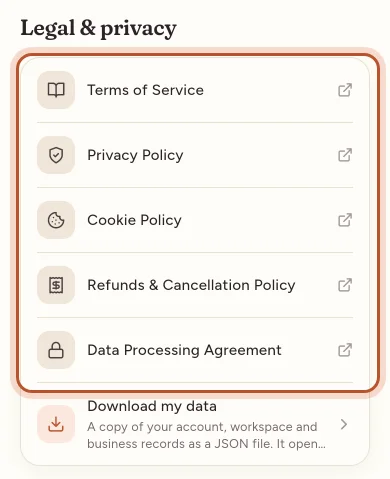
ProfitClerk publishes these pages:
- Terms of Service: the agreement for using ProfitClerk
- Privacy Policy: what personal data is collected, why, how long it is kept and your rights
- Cookie Policy: the cookies the website uses; see Cookies on the website
- Refunds & Cancellation Policy: cancelling a plan and refunds
- Data Processing Agreement: how ProfitClerk handles the personal data in your business records (such as your buyers' names and addresses) on your behalf
- Legal Notice: who runs ProfitClerk
Where to find them:
- Website: in the footer of the public pages, and in the legal links at the bottom of every page once you are signed in.
- App: More › Legal & privacy.
Other times you agree to the terms
- Signing up: the sign-up form has a box, never ticked in advance: "I agree to the Terms of Service and the Data Processing Agreement, and I have read the Privacy Policy." Teammates accepting an invitation and people signing up with Google or Apple see the same.
- Buying a plan on the website: you tick "I agree to the Terms of Service and Refunds & Cancellation Policy, and ask for my plan to start straight away." See Buying a plan on the website.
- Buying in the app: the plans screen says "By subscribing you agree to the Terms of Service and have read the Privacy Policy."
ProfitClerk keeps a record of when you agreed and to which version.
Questions about the terms or your privacy
Use Contact us and choose Privacy or my data for privacy questions and requests, or Something else for questions about the terms. We reply by email.
Questions people ask
Why am I asked to agree to the terms again?
The terms changed, and ProfitClerk asks everyone to read the new version and agree before carrying on. The page says the date they changed.
What happens if I do not agree?
You can sign out instead. You cannot use your workspace until you agree, but nothing in it is deleted.
Does every teammate have to agree?
Yes. Each person who signs in is asked once, for their own account.
Where can I read the terms at any time?
In the footer of the ProfitClerk website, and in the app under More › Legal & privacy.
Is this legal advice?
No. If you are unsure what the terms mean for your business, ask a solicitor or other qualified adviser.
Thanks for telling us.