Connect your eBay account
Link your eBay seller account to ProfitClerk in a minute: sign in on eBay's own page, allow read-only access, and your orders, fees and refunds start coming in.
To connect eBay, open Settings on the website (or More › eBay accounts in the app), select Connect eBay, sign in on eBay's own page and allow access. You come back to ProfitClerk with the account connected, and your orders, fees and refunds start coming in. The access is read-only: ProfitClerk can never change anything on your eBay account.
Before you start
- You need a plan. Connecting eBay needs an active plan or the Try pass. See Plans and what each one includes.
- You need to be the owner. Only the workspace owner can connect eBay accounts. Managers and viewers see a note saying only the workspace owner can connect eBay accounts.
- Know which eBay account you want. If you are already signed in to eBay in your browser, eBay may use that account. Sign out of eBay first if it is the wrong one.
Connect on the website
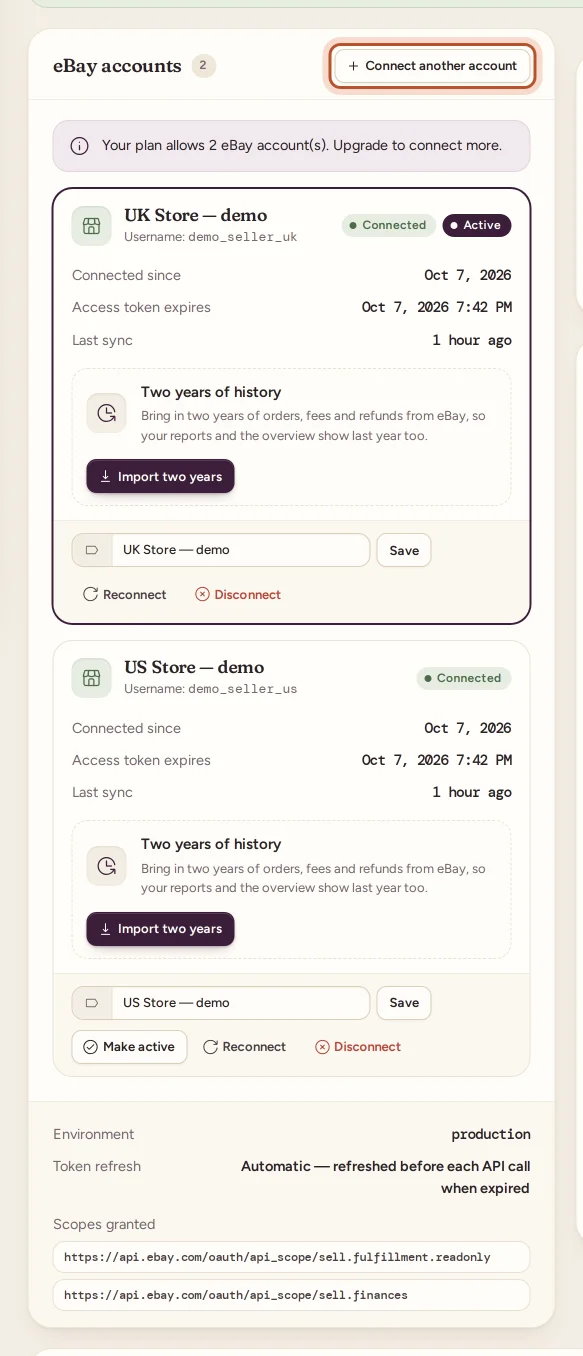
- Open Settings in the sidebar. You land on the Workspace & eBay tab.
- In the eBay accounts card, select Connect eBay.
- eBay's sign-in page opens. Sign in with the eBay account you sell from.
- eBay shows which access ProfitClerk is asking for. Read it, then agree to give access.
- eBay sends you back to Settings, with the message "eBay account connected (read-only)."
Your account now appears in the eBay accounts card with a Connected badge and, if it is your only one, an Active badge.
Connect in the app
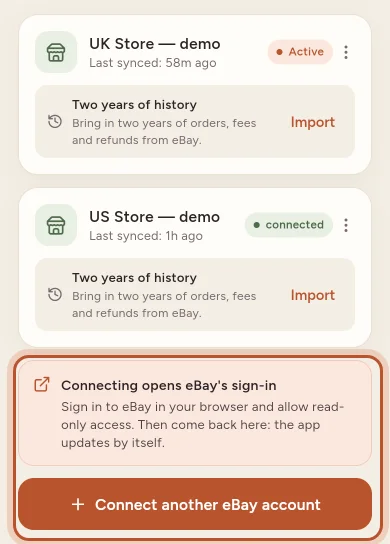
- Go to More › eBay accounts.
- Tap Connect your eBay account. As the note says, connecting opens eBay's sign-in in your browser.
- Sign in to eBay and allow read-only access.
- When the browser shows Back to the app, tap it. The eBay accounts screen updates by itself.
What eBay asks you to allow
eBay lists the access ProfitClerk requests:
- Your orders, read-only, to bring in sales, buyers' delivery details and postage.
- Your financial transactions (eBay Finances), to read the real fees, refunds, label costs and payouts. eBay has no separate "read-only" option for Finances, so it is listed as one permission, but ProfitClerk only ever reads from it.
ProfitClerk also reads your listings, using the same access, to show when items were listed, relisted, changed price or ended. It never asks for permission to manage listings or stock. Settings lists the exact permissions under Scopes granted. See eBay permissions and security.
What happens next
- The first sync brings in orders from about the last 90 days, with their fees and refunds. It happens on the next automatic sync, within 15 minutes, or straight away when you select Sync now.
- Every 15 minutes after that, ProfitClerk checks eBay for new and changed orders. See How syncing with eBay works.
- Older sales come in with the two-year import, on plans that include it. See The two-year eBay history import.
Some fees can take a little longer than the order itself: eBay records them over the following hours or days, and ProfitClerk fills them in as they arrive.
If something goes wrong
| Message | What to do |
|---|---|
| eBay authorization denied | You, or eBay, cancelled the access request. Select Connect eBay again and agree to give access. |
| Invalid OAuth state. Please try connecting again. | The sign-in took too long or started in another tab. Start again from Connect eBay. |
| Your plan allows 1 eBay account(s). Upgrade to connect more. | You already have as many accounts as your plan allows. See Connect more than one eBay account. |
| Failed to complete eBay connection | eBay did not finish the connection. Wait a minute and try again. |
Next steps
- Set your country, currency and tax profile.
- Add what your stock cost, so every sale shows its real profit.
- Got more than one eBay account? Connect them all: Connect more than one eBay account.
Questions people ask
Do I give ProfitClerk my eBay password?
No. You sign in on eBay's own page, and eBay hands ProfitClerk a read-only access key. ProfitClerk never sees or stores your eBay password.
Why is the Connect eBay button not working?
Connecting needs an active plan or the Try pass, and only the workspace owner can connect accounts. Check both, then try again.
How far back does the first sync go?
The first sync brings in orders from about the last 90 days. To go back two years, use the two-year import on plans that include it.
Can I connect an eBay account that belongs to someone else?
Only if you can sign in to it on eBay. Whoever signs in on eBay's page decides which account is connected, so make sure you are signed in to the right one.
Do I get a notification for every sale from the first sync?
No. The first sync brings in your recent orders quietly. New-sale notifications start with sales that arrive after that.
Thanks for telling us.