Your first-day set-up checklist
Get ProfitClerk ready in one sitting: choose a plan, connect eBay, set your country and tax profile, and add item costs so every sale shows real profit.
To get ProfitClerk working, do four things on your first day: choose a plan, connect your eBay account, set your country and tax profile, and add what your stock cost. After that, your sales arrive by themselves and every one shows its real profit.
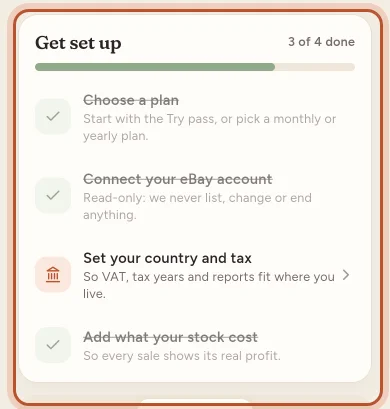
In the app, a Get set up card at the top of Home tracks these four steps and shows "1 of 4 done", "2 of 4 done" and so on. Tap a step to go straight to it.
1. Choose a plan
There is no free trial, so a new workspace has no plan. Without one, ProfitClerk cannot connect eBay or sync orders.
- On the website: open Billing in the sidebar.
- In the app: the plans screen opens after you sign up, or tap Choose a plan in the Get set up card.
Pick the Try pass to try ProfitClerk for a short period, or a monthly or yearly plan. Plans differ in how many eBay accounts, orders a month, SKUs and team seats they allow, and whether they include the two-year history import. See Plans and what each one includes.
2. Connect your eBay account
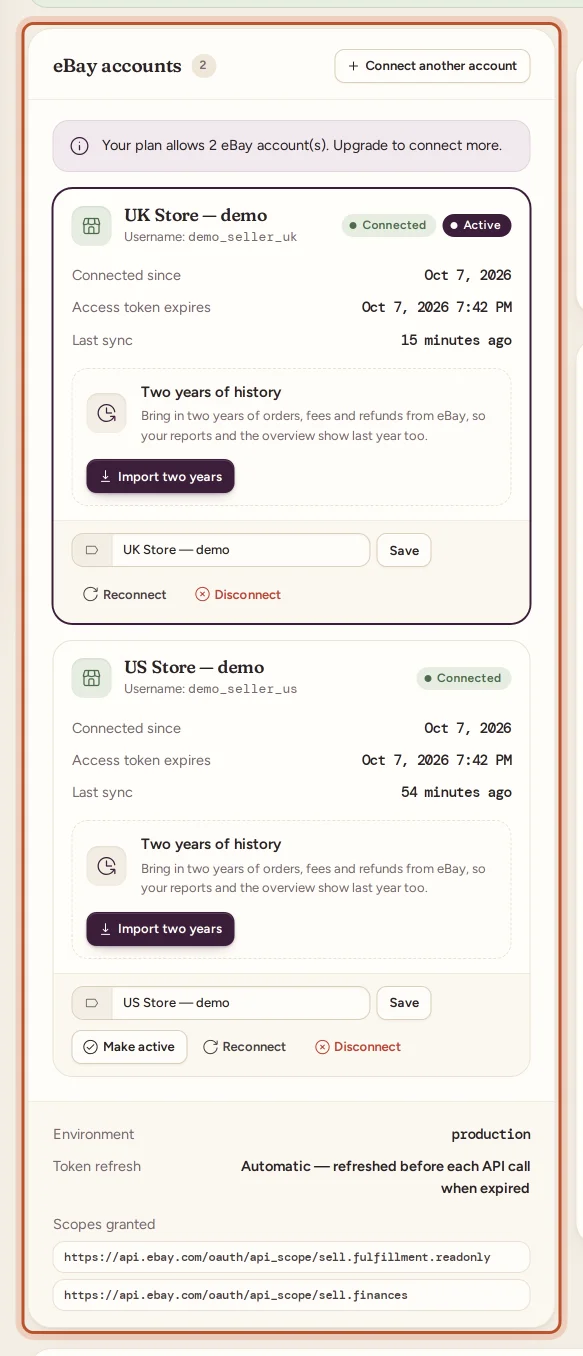
- On the website, open Settings and stay on the Workspace & eBay tab. In the app, go to More › eBay accounts.
- Select Connect eBay (in the app, Connect your eBay account).
- Sign in on eBay's own page and allow read-only access.
- You come back to ProfitClerk with the message "eBay account connected (read-only)."
The first sync brings in your recent orders, and after that ProfitClerk checks eBay every 15 minutes. ProfitClerk never lists, changes or ends anything on eBay. Step by step: Connect your eBay account.
3. Set your country, currency and tax profile
Your Country and tax profile tells every report which currency to use, when your tax year starts, whether you are registered for VAT or GST, and whether your eBay account is personal or business.
- On the website: Settings, the Country and tax profile card.
- In the app: More › Country and tax.
Choose your Home country first: the tax year start is filled in for you. Then select Save profile. See Set your country, currency and tax profile.
4. Add what your stock cost
eBay knows what you sold an item for, but not what you paid for it. Add your item costs so ProfitClerk can take them off each sale:
- One item or a restock: Inventory › Add stock on the website, or the + button in the app.
- A job lot or a box of mixed items: Inventory › Buy a lot shares one price across the items. See Job lots.
- A spreadsheet of costs: Orders › Import costs on the website.
Use the same SKU as on your eBay listing, so sales match the right item. You do not have to do everything at once: start with the items that sell most. Sales without a cost are flagged, and they are left out of your margin until you add one. See Add missing item costs.
Optional, but worth doing
- Import two years of history. On plans that include it, bring in your last two years of orders, fees and refunds so you can compare this year with last. See See your last two years of eBay sales.
- Get the app and turn on notifications for new sales, refunds and payouts. See Get the ProfitClerk app.
- Turn on two-step sign-in to protect your account. See Two-step sign-in.
- Invite your team. Add a manager or a viewer from Team. See Team members and roles.
- Log your expenses and trips, such as packaging, storage or drives to the post office. See Expenses.
Check it is all working
Open the Overview on the website or Home in the app. You should see:
- the eBay connection card with your account and a recent Last sync
- your recent sales, each with a profit figure
- the Cost confidence card, which shows how much of this month's profit rests on estimated or missing costs
If sales have not appeared after a few minutes, select Sync now. If something still looks wrong, see My profit looks wrong. For a guided look at the page, see A tour of the overview.
Questions people ask
How long does set-up take?
Choosing a plan, connecting eBay and setting your country take a few minutes. Adding item costs takes longer the more stock you have, but you can start with your best sellers and fill in the rest later.
Why can I not connect eBay straight after signing up?
Connecting eBay needs an active plan or the Try pass. Choose one on the Billing page, or on the plans screen in the app, and the connect button works.
My sales show a profit that looks too high. Why?
Usually because those sales have no item cost yet, so nothing is taken off for the item. Add the cost in Inventory and the profit is worked out again.
Can a team member do the set-up for me?
A manager can add stock costs, expenses and start the history import, but only the owner can buy a plan, connect eBay and change the country and tax profile.
Where is the set-up checklist in the app?
New workspaces see a Get set up card at the top of Home with four steps and a progress bar. It disappears once every step is done.
Thanks for telling us.