The website and the mobile app compared
ProfitClerk works on the website and in the iPhone and Android app, on one shared workspace. See what each does and which tasks open the website from the app.
You can use ProfitClerk on the website and in the mobile app for iPhone and Android. Both work on the same workspace with the same figures: the app is a full version of ProfitClerk, not a cut-down companion. A few tasks that need a browser, such as eBay's own sign-in and spreadsheet imports, open the website from the app.
Where things are
| Task | Website | App |
|---|---|---|
| Profit at a glance | Overview | Home tab |
| Orders and their profit | Orders | Sales tab |
| Parcels and label costs | Shipping | Sales › To ship |
| Stock and item costs | Inventory | Stock tab |
| Expenses and mileage | Expenses, Mileage | Money tab, or + |
| Reports, tax, payouts, accounting | Reports, Tax, Accounting | Money tab |
| eBay accounts and sync | Settings (Workspace & eBay) | More › eBay accounts |
| Country and tax profile | Settings | More › Country and tax |
| Team | Team | More › Team members |
| Your plan | Billing | More › Your plan |
| Two-step sign-in | Settings › Your profile | More › Security and sign-in |
On the website the sidebar groups pages under Day to day, Stock & numbers and Your workspace. In the app the five tabs are Home, Sales, Stock, Money and More. See The app's tabs.
What the app does especially well
- Quick add. The + button adds a sale's cost, stock, a job lot, an expense or a trip in a few taps.
- Receipts from the camera. Photograph a receipt as you add an expense.
- Notifications. New sales with their profit, refunds, payouts, eBay sync problems, the end of the two-year import and tax deadlines. Choose which ones in More › Notifications.
- Instant start. The app remembers your last figures, so it opens straight away and shows them while it fetches new ones.
What opens the website from the app
Some things only work in a browser. The app opens them for you, already signed in, through a one-time link:
- Connecting or reconnecting eBay: eBay's sign-in page. See Connect your eBay account.
- Linking accounting software: Xero, QuickBooks Online or FreeAgent sign in on their own pages.
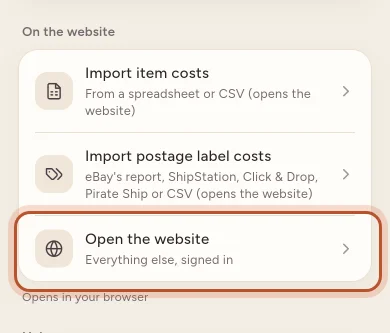
- Import item costs and Import postage label costs from a spreadsheet or CSV, under More › On the website.
- Downloads: CSV exports, tax files and Download my data.
After eBay's or the accounting software's sign-in, the page offers Back to the app, and the app refreshes by itself. See When the app opens the website.
Buying a plan
- On the website you pay through the website's checkout on the Billing page.
- In the app you buy through the App Store on iPhone or Google Play on Android.
Either way, the plan belongs to the workspace and works everywhere. Change or cancel it where you bought it. See Plans and what each one includes.
Signing in
Use the same email and password, or the same Google account, on both. The iPhone app also offers Continue with Apple. If you turn on two-step sign-in, both ask for your code.
Language and appearance
Both come in English, German, French, Italian, Spanish, Dutch, Polish and Chinese (Hong Kong). The app also has light and dark themes under More › Appearance.
Which should I use?
- Checking today's profit, adding a cost after a buying trip, logging a drive: the app.
- Importing a spreadsheet of costs or labels, working through a long list of orders, preparing tax figures: the website, with its bigger screen.
To install the app, see Get the ProfitClerk app.
Questions people ask
Do I need both the website and the app?
No. Either one is enough for day-to-day use, and both show the same workspace. Most sellers use the app for quick checks and adding costs, and the website for imports and longer reports.
Is my data the same on both?
Yes. The website and the app read the same workspace, so a cost you add on your phone shows on the website straight away, and the other way round.
Can I connect eBay from the app?
Yes. In More › eBay accounts, the connect button opens eBay's sign-in in your browser. After you allow access, tap Back to the app and the account appears.
Can I buy a plan on the website and use it in the app?
Yes. One workspace has one plan wherever you bought it. You change or cancel it where you bought it.
Does the app work offline?
Home shows the figures from the last time it connected and says that you are offline. New data and changes need a connection.
Thanks for telling us.