What ProfitClerk does and who it is for
ProfitClerk brings in your eBay orders, real fees, refunds and postage, matches them to what your stock cost, and shows the true profit on every sale.
ProfitClerk is a profit tracker for eBay sellers. It connects to your eBay account (read-only), brings in every order with the real fees eBay charged, refunds and postage, matches each sale to what the item cost you, and shows the profit you actually made, sale by sale and month by month.
It is built for people who sell on eBay and want to know their real numbers without a spreadsheet: resellers and flippers, small shops with their own stock, and sellers who buy job lots and split the cost. It works the same whether you sell a few items a week or thousands a month.
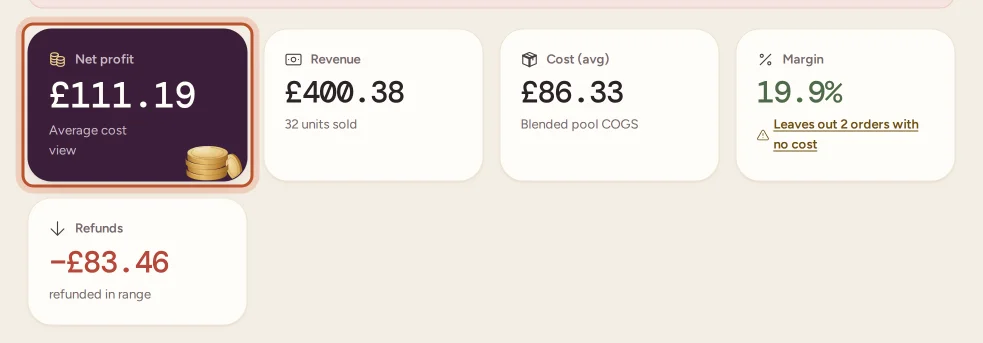
What ProfitClerk does for you
Brings in your eBay sales by itself
Once your eBay account is connected, ProfitClerk checks for new and changed orders every 15 minutes. Each order comes in with:
- the sale price and the postage the buyer paid
- every fee eBay charged on it, read from eBay's own financial records, not estimated
- Promoted Listings fees matched to the sale they belong to
- refunds and cancellations, with the date they happened
- the eBay Labels postage you bought, including bulk label purchases shared over their orders
You never type in a sale. See How syncing with eBay works.
Works out real profit on every sale
You add what your stock cost, once, in Inventory (single items, restocks or job lots). ProfitClerk matches each sale to its item by SKU and takes off the item cost, eBay's fees, postage and any refund. You can view costs as an Average or FIFO (first in, first out); see Average cost or FIFO.
Where a cost is only estimated or still missing, ProfitClerk tells you, so you never mistake an overstated profit for a real one. The Cost confidence card shows how much of your profit rests on confirmed costs.
Keeps the rest of your business in one place
- Expenses and Mileage for costs that are not stock or eBay fees, with receipts. See Expenses.
- Reports: profit and loss, eBay fees, ad spend, breakdowns by category, brand or eBay site, best sellers, slow movers and unsold stock.
- Tax: a tax centre built around your home country, with VAT or GST figures, thresholds, deadlines and tax-year exports. ProfitClerk gives you the figures; it does not give tax advice.
- Accounting: eBay payouts posted to Xero, QuickBooks Online or FreeAgent as one summary per payout.
- Team: invite a manager or a viewer to work in your workspace.
What ProfitClerk does not do
- It does not list, revise, end or reprice items on eBay, and it never changes your eBay stock. Its eBay access is read-only. See eBay permissions and security.
- It does not file tax returns for you or tell you what to pay. The tax centre prepares figures for you or your accountant.
- It does not track sales from other marketplaces. It is made for eBay.
Website and app
You can use ProfitClerk on the website and in the mobile app for iPhone and Android. The app is a full version of the product, not a cut-down companion: you can check profit, add stock costs, log expenses and trips, and manage your eBay accounts from your phone. A few things, such as eBay's own sign-in and spreadsheet imports, open in your browser. See The website and the mobile app.
ProfitClerk is available in English, German, French, Italian, Spanish, Dutch, Polish and Chinese (Hong Kong).
How to start
- Create your account on the website or in the app.
- Choose the Try pass or a plan. There is no free trial; see Plans and what each one includes.
- Connect your eBay account.
- Set your country, currency and tax profile.
- Add what your stock cost, so every sale shows its real profit.
The first-day set-up checklist walks through each step.
Questions people ask
Does ProfitClerk change anything on my eBay account?
No. ProfitClerk only reads your orders, financial transactions and listings. It never lists, edits, ends or reprices anything, and it never changes your stock on eBay.
Do I need to be a business to use ProfitClerk?
No. It works for hobby sellers, side hustles and full-time businesses alike. You tell it whether your eBay account is personal or business in the country and tax profile, so VAT on fees is handled the right way.
Which eBay sites does it work with?
It reads orders from your eBay seller account wherever they were sold, and reports can group sales by eBay site, such as eBay UK, eBay US or eBay Germany. See the article on supported eBay sites for details.
Is there a free version?
There is no free plan, but the free calculators on the website and in the app work without an account. To track your own sales you need the Try pass or a monthly or yearly plan.
Can my bookkeeper or a helper use it too?
Yes. You can invite team members as a manager or a viewer, depending on your plan's team seats.
Thanks for telling us.