Set a monthly profit goal and track it
Set the net profit you aim for each month and watch this month's profit close in on it, on the Overview and the app's Home, with where you are heading.
A monthly profit goal is the net profit you aim for each calendar month. Set it once and the Overview on the website and Home in the app show this month's profit against it, how much is left and whether you are on track.
Set your goal
On the website
- Open Overview.
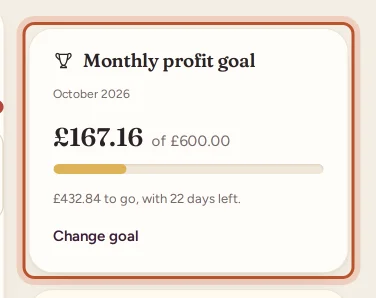
- In the right-hand column, find Monthly profit goal.
- Type the profit you aim for under Net profit you aim for each month and click Save goal.
To change it later, click Change goal. To remove it, empty the box and save.
In the app
- Open Home.
- Tap Set a monthly profit goal.
- Enter the Profit goal per month and tap Save goal.
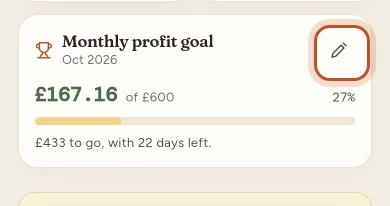
To change it, tap the pencil on the Monthly profit goal card. Remove goal takes it away.
What the card shows
- This month's profit so far, next to of your goal, with a bar and the percentage reached.
- One line on where you stand:
- Goal reached once this month's profit passes the goal.
- On track when the month so far, carried on at the same pace to its last day, reaches the goal. It says where that pace ends the month.
- Otherwise, how much is to go and how many days are left.
The app throws a little confetti the first time each month that you reach your goal.
How the profit is counted
The goal uses the same net profit as the Overview: sales less eBay's fees, postage labels, packaging, item costs and refunds, for orders sold this calendar month. It follows the Average or FIFO cost view you have picked. See How your profit is worked out.
The goal is shared by everyone in the workspace. Owners and managers can set or change it; viewers can only see it.
Questions people ask
Which profit counts towards the goal?
Net profit on the sales made this calendar month, worked out exactly like the Overview's Net profit figure, in the cost view you are looking at (average cost or FIFO).
Does the goal start again each month?
Yes. The same goal applies to every month and the progress starts from nothing on the first day of each month.
What does On track mean?
It takes the profit so far this month and carries it on at the same pace to the last day. If that reaches your goal, you are on track.
Who can set the goal?
The workspace owner and managers. Viewers see the goal and the progress but cannot change it.
How do I remove the goal?
Empty the goal box and save it on the website, or tap Remove goal in the app.
Thanks for telling us.