A tour of the Overview and the app's Home
Find your way around the Overview on the website and Home in the app: net profit, the date range, daily profit, the last 12 months and cost confidence.
The Overview on the website and Home in the app answer one question first: how much profit did you make? The big figure is your net profit for the period: your sales, less eBay's fees, postage, item costs and refunds. Everything else on the page explains where that number came from.
The Overview on the website
Open Overview at the top of the sidebar.
Date range and Sync now
At the top, two date boxes and Apply set the period. When you first open the page it shows the last 7 days, today included.
Sync now asks eBay for new and changed orders straight away, instead of waiting for the next automatic sync (every 15 minutes). The small arrow beside it opens Re-import missed orders for gaps after downtime. See Re-import missed orders.
Cost view and SKU
The Cost view switch picks Average or FIFO for every cost and profit figure on the page. See Average cost or FIFO. The SKU box narrows the whole page to one item; Clear goes back to all SKUs.
The headline figures
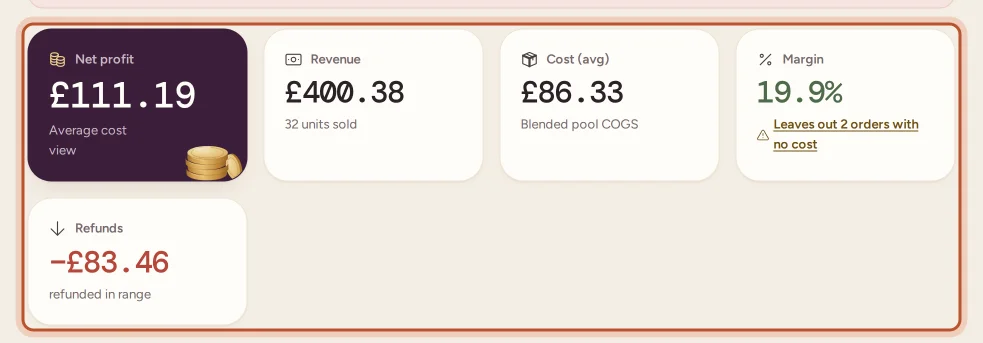
- Net profit: what you kept after every cost, in the chosen cost view.
- Revenue: what buyers paid, with the number of units sold.
- Cost: the cost of the items you sold.
- Margin: profit ÷ revenue. Orders with no item cost are left out; a warning says how many.
- Refunds: money refunded in the period.
If some orders have no item cost, a notice above the figures says so, with Fix it to open them.
Last 12 months
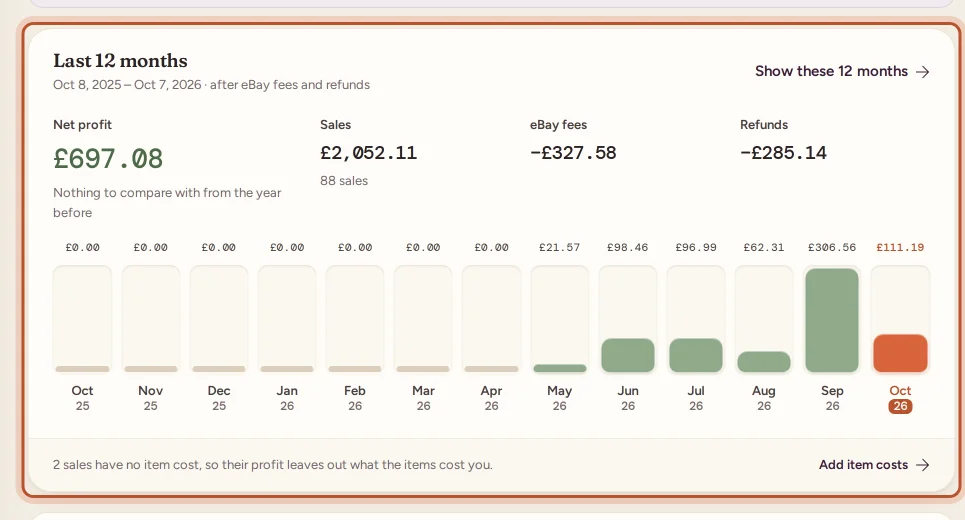
This card shows your net profit, sales, eBay fees and refunds for the last 12 months, compared with the 12 months before, and a bar for each month. Show these 12 months sets the whole page to that year. It fills in properly once you import two years of history.
Cost confidence
Cost confidence shows how much of this month's profit rests on costs that are confirmed, estimated or missing, for example label costs assumed from the postage the buyer paid, or sales with no item cost. Review opens the orders behind it.
This week, recent sales and refunds
- This week: daily net profit as bars, today highlighted, with the Week total and your best day.
- Recent sales: the latest sales with SKU, quantity, cost and profit. All orders opens the Orders page.
- Recent refunds: the latest refunds with the date they happened.
The right-hand column
- Monthly profit goal: this month's net profit against the goal you set, with how far there is to go. See Set a monthly profit goal.
- Today: net profit so far today and today's sales.
- eBay connection: your active eBay account, whether it is connected, and when it last synced. Open settings goes to your eBay accounts.
- Plan usage: how close you are to your plan's limits, and when the orders meter resets.
Notices can also appear at the top: a two-year import in progress, a plan limit you are close to, or your next tax deadline.
Home in the app
Home is the first tab. At the top, the circular button with arrows is Sync now and + opens quick add (stock cost, a job lot, an expense, a trip and more).
- Get set up: on a new workspace, the four set-up steps. See Your first-day set-up checklist.
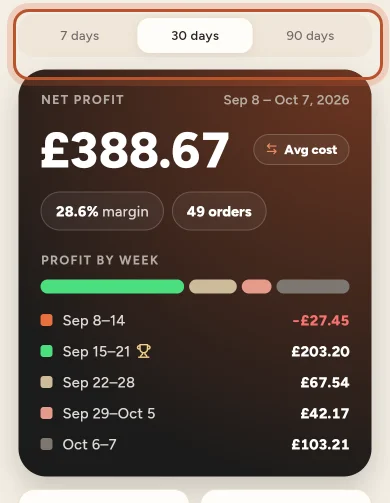
- Period switch: 7 days, 30 days or 90 days.
- Net profit card: the profit for the period with margin and order count, the cost method pill (average cost or FIFO), and the profit split by week (by day over 7 days, by month over 90).
- Tiles: Revenue, eBay fees, Refunds and Units sold.
- Monthly profit goal: this month's profit against your goal, or Set a monthly profit goal. See Set a monthly profit goal.
- Profit by day: a chart of each day's profit.
- Last 12 months: your year against the one before.
- How sure are these costs?: the cost confidence summary.
- Recent sales: tap one to open the order; All sales opens the Sales tab.
- Low stock: items running out, with how many are left.
- Plan usage: your plan's meters.
Pull down to refresh. If you are offline, Home shows the figures from the last time it connected and says so. See The Home screen in the app.
Questions people ask
What period does the Overview show when I open it?
The website shows the last 7 days, today included. Pick other dates with the two date boxes and Apply. In the app, switch Home between 7 days, 30 days and 90 days.
Why is my margin based on fewer orders than I sold?
Orders with no item cost would make your margin look better than it is, so they are left out of it. The margin card says how many were left out and links to them.
What is the difference between Average and FIFO on the Overview?
They are two ways of valuing the stock you sold. Average uses the blended cost of all units of an item; FIFO uses the cost of the oldest units first. Switching changes the cost and profit figures, never your sales or fees.
Why does the Last 12 months card not appear?
It appears once there are sales in the last 12 months, and it is hidden while you filter the Overview by one SKU. Import two years of history to fill in last year as well.
Do team members see the same Overview?
Yes. Everyone in the workspace sees the same figures. Viewers do not see the Sync now button, because they cannot change anything.
Thanks for telling us.