Why some things open the website from the app
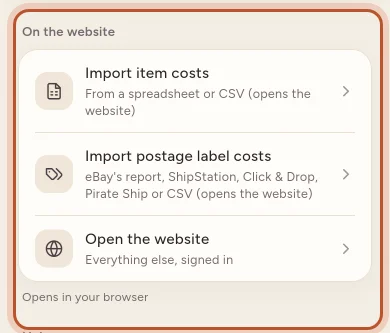
eBay sign-in, accounting sign-in, imports and downloads open in your browser from the ProfitClerk app, already signed in. Tap Back to the app when you are done.
A few things in ProfitClerk only work in a web browser: signing in to eBay or to your accounting software, importing spreadsheets, and downloading files. When you start one of these in the app, it opens the right page on the website in your phone's browser, already signed in. When you have finished, tap Back to the app.
What opens the website
- Connecting eBay or signing in to eBay again: More › eBay accounts › Connect your eBay account (owners only).
- Connecting accounting software: Money › Accounting › Connect Xero, QuickBooks or FreeAgent, and Where each line goes, where you choose accounts and tax rates.
- Imports: More › Import item costs (from a spreadsheet or CSV) and More › Import postage label costs (eBay's report, ShipStation, Click & Drop, Pirate Ship or CSV).
- Downloads: Export (CSV) on Sales, Unsold stock and Sourcing, Export expenses (CSV), Export log (CSV) for mileage, the profit and loss, report exports and the tax centre's Tax-year exports.
- More › Open the website: everything else, signed in.
- More › Legal & privacy › Download my data.
How it works
- You tap the button in the app.
- The app makes a one-time link that signs your browser in as you and opens that page. The link works once, for a few minutes.
- You do what you came for: sign in to eBay, pick a file, or let the download finish.
You do not need to know your website password for this. Whoever is signed in to the app is who the browser is signed in as.
Coming back: "Back to the app"
After eBay's or your accounting software's sign-in, the website shows All set (or That did not work) with "You can close this page and go back to the app. It updates by itself." Tap Back to the app: your phone switches back to ProfitClerk, and the screen you started from checks again and shows the new connection.
You can also just switch back to the app yourself. The eBay accounts and Accounting screens reload when the app comes back to the front.
If you would rather carry on in the browser, tap Stay on the website.
The same Back to the app button appears after you confirm your email address or set a new password on the website from a phone.
If the link has expired
If you see "That link from the app has expired or was already used. Sign in here, or open it again from the app.", the link was used already or too much time passed. Go back to the app and tap the button again for a fresh link, or sign in on that page.
Who can open what
The website checks your role, just as the app does:
- Only the owner can connect or change eBay accounts.
- Owners and managers can connect accounting software and import costs and label costs.
- Everyone, viewers included, can download exports and open the website.
Some of these also need a plan, because a workspace without one is read-only. See Read-only without a plan.
Questions people ask
Do I have to sign in to the website again?
No. The app opens the page with a one-time link that signs your browser in for you. The link only works once and only for a few minutes.
It says the link from the app has expired. What now?
Go back to the app and tap the same button again for a fresh link. You can also sign in on that page with your email and password.
I connected eBay but the app still says not connected.
Tap Back to the app on the page that appears after eBay's sign-in, or switch back to the app yourself. The app checks again when it comes back to the front. Pull down on eBay accounts to refresh if needed.
Where do downloaded files go?
They download in your phone's browser, so they land wherever your browser saves downloads, usually the Files app on iPhone or the Downloads folder on Android.
Why does the app not buy plans on the website?
Plans in the app are bought through the App Store or Google Play. The website sells plans separately.
Thanks for telling us.