Turn on notifications on your phone
Get a phone notification for each eBay sale with its profit, refunds, payouts and eBay problems. Turn them on, choose which ones, or switch them on later.
The ProfitClerk app can tell you about each new eBay sale with the profit it made, refunds and payouts, and problems with your eBay connection, as they happen. Turn them on when the app asks, or any time in More › Notifications, and choose which ones you want.
When the app asks
The app never asks out of the blue. Shortly after you sign in, once Home has loaded and nothing else is open, a sheet asks Turn on notifications? and explains what they are for:
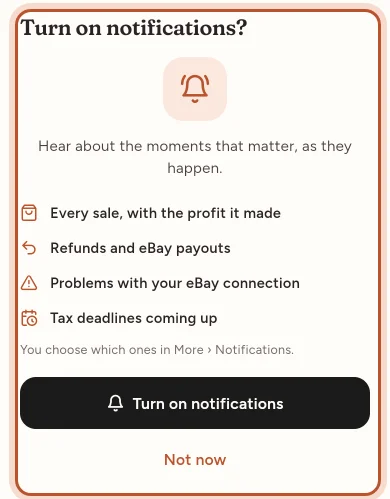
- Every sale, with the profit it made
- Refunds and eBay payouts
- Problems with your eBay connection
- Tax deadlines coming up
Tap Turn on notifications and your phone shows its own permission box: allow it, and you see "Notifications are on."
Tap Not now and the app asks once more a week later, at most. After you have answered the phone's own box, the sheet never comes back.
Turn them on later
- Open More › Notifications.
- If notifications are off on this phone, a notice says Notifications are off on this phone. Tap Turn on.
- On iPhone, if you said no before, the button says Open Settings instead: it opens the app's page in Settings. Switch on Allow Notifications, then come back to the app.
You can also do it straight from your phone's settings:
- iPhone: Settings › ProfitClerk › Notifications.
- Android: Settings › Apps › ProfitClerk › Notifications.
When you come back to the app after switching them on, the app starts receiving them.
Choose which notifications you get
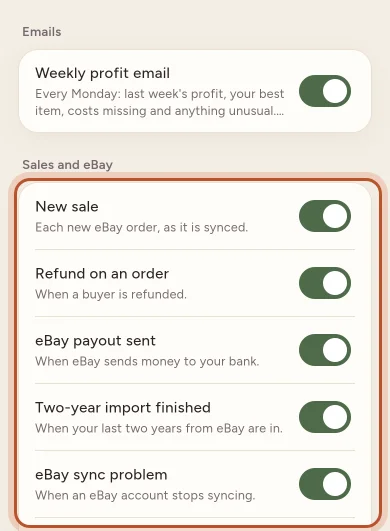
More › Notifications has a switch for each kind, in groups:
- Sales and eBay: New sale, Refund on an order, eBay payout sent, Two-year import finished, eBay sync problem, Accounting software disconnected, Payout not posted and Tax reminders.
- Plan and billing: for example Plan activated, Payment received, Renewal coming up, Payment overdue and Order limit reached.
- Account: Team member joined, Sign-in from a new device and Password changed.
- Workspace and News: a suspended or reactivated workspace, and occasional News and announcements.
Switch off anything you do not want. Your choices are saved straight away and apply to this phone, your other devices and your browser.
Owners also see Emails with the Weekly profit email switch: every Monday, last week's profit, your best item, costs missing and anything unusual.
What notifications look like
On Android, a notification that arrives while the app is open shows as a banner inside the app. On iPhone, the phone shows its usual banner. Tap a notification to go straight to the order, or to the matching tab.
Questions people ask
Which notifications can I get?
New sales with their profit, refunds, eBay payouts, the two-year import finishing, eBay sync problems, accounting software problems, tax reminders, plan and billing messages, account security alerts and occasional news. You choose which ones in More › Notifications.
I tapped Not now. How do I turn them on later?
Open More › Notifications and tap Turn on on the notice at the top. On iPhone, if you said no to the phone's own box, tap Open Settings and switch on notifications for the app there.
Do my choices apply to my other devices?
Yes. The switches in More › Notifications apply to this phone, your other devices and your browser. Whether the phone shows notifications at all is set on each phone.
Do team members get sale notifications too?
Sale, refund, payout, eBay, accounting, tax and plan notifications go to the workspace owner. Security alerts, such as a sign-in from a new device, go to each person for their own account.
What happens when I tap a notification?
A sale or refund opens that order. Other notifications open the matching tab, such as Money for payouts and tax or More for your plan and security.
Thanks for telling us.