Dark mode and language in the app
Switch the ProfitClerk app to dark mode, light mode or like your phone, and pick its language (English, German, French, Italian, Spanish, Dutch, Polish or Chinese).
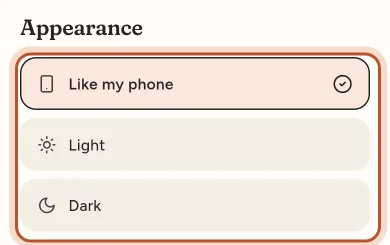
To switch between light and dark mode, open More › Appearance and choose Like my phone, Light or Dark. To change the language, open More › Language and pick one from the list. Both change straight away.
Light, dark or like your phone
- Open the More tab.
- Under App, tap Appearance. The line under it shows the current choice.
- Choose:
- Like my phone: follows your phone's light or dark setting, changing when your phone does. This is the default.
- Light: cream and white screens with dark text.
- Dark: dark screens, easier on the eyes at night.
Your choice is kept on this phone.
The big figure cards at the top of Home, Money, Stock and other screens stay dark in both modes, with green for money in and red for money out. Lists, tiles and forms follow your choice.
Change the language
- Open the More tab.
- Under App, tap Language. The line under it shows the current language.
- Pick one: English, Deutsch, Français, Italiano, Español, Nederlands, Polski or 繁體中文.
The app changes at once. When you are signed in, the language is also saved to your account, so the website, emails and notifications follow it. When you sign in on another phone, the app picks up the language saved to your account.
Before you sign in, the app starts in your phone's language if it is one of these, otherwise English. You can also change it on the welcome screen with the language button at the top.
Less motion
The app has a few small animations: figures that count up, cards that rise in, a trophy on your best week and confetti for milestones. If you prefer things still, turn on your phone's reduce motion setting:
- iPhone: Settings › Accessibility › Motion › Reduce Motion.
- Android: Settings › Accessibility › Remove animations (the name varies by phone).
The app notices and keeps everything still. The figures are the same either way.
The website
Light and dark mode is a setting of the app on this phone only. The language is shared with your account: pick it once in the app or on the website and both follow, along with the emails and notifications we send you.
Text size
The app follows your phone's text size. Make text larger or smaller in your phone's display or accessibility settings.
Questions people ask
Does dark mode follow my phone?
Yes, by default. Like my phone switches between light and dark when your phone does. Choose Light or Dark in More › Appearance to keep one.
Does changing the language in the app change it on the website too?
Yes, when you are signed in. The language is saved to your account, so emails and the website follow it too.
Why are some words still in English?
New features are written in English first and translated in batches, so a few new words may show in English for a while.
Can I stop the animations and confetti?
Yes. Turn on your phone's reduce motion setting (Reduce Motion on iPhone, Remove animations on Android). The app then keeps everything still.
Does the language change the currency?
No. Money is always shown in your workspace currency, set in More › Country and tax. The language changes the words and how dates and numbers are written.
Thanks for telling us.