Free calculators in the app, no account needed
Use the free eBay fee, profit margin, job lot, VAT, mileage and tax calculators in the ProfitClerk app without signing in, from the welcome screen or More.
The ProfitClerk app includes free calculators for online sellers: eBay fees, profit margin, job lots, VAT, mileage, tax to put aside and more. You do not need an account. Tap Try the free calculators on the welcome screen, or, once signed in, More › Free calculators.
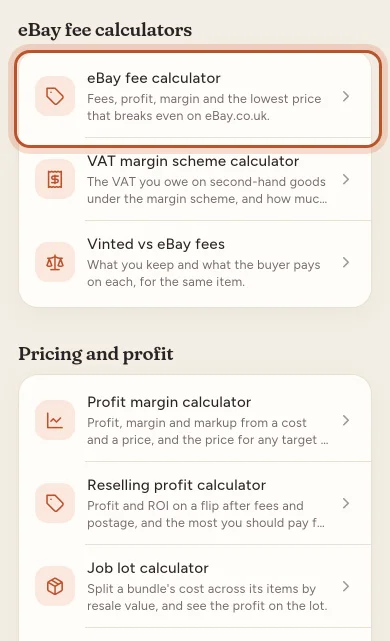
Open the calculators
- Not signed in: on the welcome screen, tap Try the free calculators (No account needed).
- Signed in: open More and tap Free calculators under Tools.
What is there
The calculators are grouped. Which ones you see can depend on your country.
eBay fee calculators
- eBay fee calculator: fees, profit, margin and the lowest price that breaks even on your eBay site.
- VAT margin scheme calculator: the VAT you owe on second-hand goods under the margin scheme, and how much it saves against the standard scheme.
- Vinted vs eBay fees: what you keep and what the buyer pays on each, for the same item.
Pricing and profit
- Profit margin calculator, Reselling profit calculator, Job lot calculator, Sell-through rate calculator and Break-even calculator.
Tax and admin
- VAT calculator, VAT threshold checker, Sales reporting checker, Mileage allowance calculator and Tax set-aside calculator.
Comparisons
- Trading allowance vs expenses, Margin vs markup, FIFO vs average cost and Spreadsheet vs ProfitClerk.
Using a calculator
- Tap a calculator. It opens with a worked example, so you can see how it works straight away.
- Change any figure to your own. The results update as you type or pick.
- Read How it works for the sums, and Questions for common ones.
- Tap the circular arrow at the top (Start again) to clear every figure, or a calculator under Related calculators to move on.
Where a result depends on official figures, such as a mileage rate or a VAT threshold, the calculator says where it comes from, with Open the source.
The Deal calculator for your own sales
Signed in, you also have the Deal calculator (More › Deal calculator, or + › Check a price). It works out the Break-even price, the price for your target profit, margin or ROI, and the Most you can pay for an item. It can use My own fees (from my recent sales) as well as eBay's published fees. Nothing is saved to your sales or stock.
From calculator to real figures
The calculators work on one item at a time. To see the real profit on every eBay sale, with eBay's actual fees, your postage and what your stock cost, tap Create your account at the bottom of a calculator when you are not signed in.
Questions people ask
Do I need an account to use the calculators?
No. Tap Try the free calculators on the welcome screen. They work without signing in. Signed-in users find them in More › Free calculators.
What is the difference between the free calculators and the Deal calculator?
The free calculators are general tools anyone can use. The Deal calculator, in More and in Quick add as Check a price, is for signed-in users and can use your own fees from your recent sales.
Are the eBay fees in the calculator exact?
They use eBay's published fees for the site, and eBay changes its fees from time to time. Check eBay's own fee page before relying on a figure.
Why are the calculators already filled in?
Each one opens with a worked example. Change any figure to use your own, or tap the circular arrow at the top (Start again) to clear every figure.
Are the calculators the same as on the website?
Yes. The app uses the same sums and the same wording as the website's free tools.
Thanks for telling us.