Buying a plan in the app (App Store and Google Play)
Buy, change, restore or cancel a ProfitClerk plan in the app through the App Store on iPhone or Google Play on Android, and see where your plan is managed.
In the app, you buy a ProfitClerk plan through your phone's store: the App Store on iPhone or Google Play on Android. The price is shown in your store's currency, payment goes to your Apple ID or Google Play account, and you manage or cancel it in that store.
Choose a plan
The plans screen opens by itself after you sign up, when a plan has ended, or when you reach a plan limit. You can also open it from More › Your plan › Choose a plan (or Change plan).
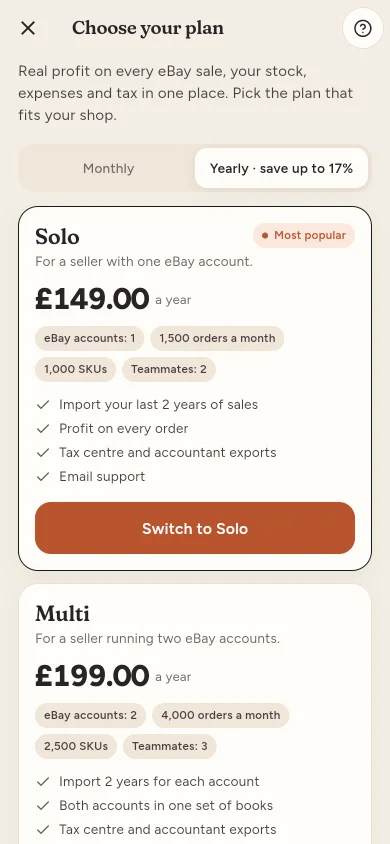
- Choose Monthly or Yearly.
- Compare the plans: their limits (eBay accounts, orders a month, SKUs, teammates) and features.
- Tap Choose on the plan you want, or the pass under Try it first to try it once before a monthly or yearly plan.
- Confirm the payment in the store's own box.
When the store confirms, you see "Thank you! Your plan is active." If the store needs longer, the app says it is waiting for the store to confirm your payment.
For what each plan includes, see Plans and limits.
Your plan
More › Your plan shows the status, days left, when it renews or ends, where it was bought, your usage this month (orders, SKUs, team seats, eBay accounts) and your payments.
- Bought in this app: Manage in the App Store (iPhone) or Manage in Google Play (Android) opens your store subscriptions, where you can change or cancel.
- Bought on the website: Manage subscription explains that it is billed on the website, with Cancel plan.
- Bought in the app on another phone with the other store: the app says it was Bought on another device. Open ProfitClerk on that device to change or cancel it.
Restore purchases
On a new phone, or after reinstalling, tap Restore purchases on the plans screen. The app checks your store account and links any ProfitClerk plan it finds to your workspace.
If you cancel or your plan ends
You keep your plan until the end of the period you paid for. After that your workspace becomes read-only: your figures are all there, but new orders do not sync and nothing can be changed until a plan is chosen. See Read-only without a plan.
Common questions about paying in the app
- Which currency will I pay in? The store shows the price in your App Store or Google Play currency. If the store cannot be reached, the app shows the price it has from ProfitClerk instead.
- Is the yearly plan cheaper? The Yearly switch shows how much you save compared with paying monthly.
- Can I buy on the website instead? Yes, but a plan is billed in one place only. If your plan came from the website, the app says so: change it there, or cancel it under Your plan.
Questions people ask
I bought my plan on the website. Can I change it in the app?
The app shows that your plan is billed on the website. Change your plan or payment details on the website; you can also cancel it from Your plan in the app.
I got a new phone. Do I have to pay again?
No. Sign in with the same account and your plan is there. If the app asks, tap Restore purchases on the plans screen, using the same Apple ID or Google account you bought with.
How do I cancel a plan I bought in the app?
Open More › Your plan and tap Manage in the App Store on iPhone or Manage in Google Play on Android. Cancelling there stops the renewal; you keep the plan until the end of the period you paid for.
Why can't I choose a plan?
Only the workspace owner can choose a plan. Managers and viewers see a note asking them to ask the owner.
What happens when my plan ends?
Your workspace becomes read-only. Your figures stay, but new orders do not sync and nothing can be changed until a plan is chosen.
Thanks for telling us.