Quick add: stock, job lots, expenses and trips
The + button in the app adds stock, a job lot, an expense with a receipt photo or a mileage trip in a few taps, or checks a price before you buy or list.
Tap the black + button at the top of Home, Stock or Money to open Add something. From there you can add stock, a job lot, an expense or a trip, or check a price, without hunting through the tabs. Each choice opens its form; save it and you are back where you were.
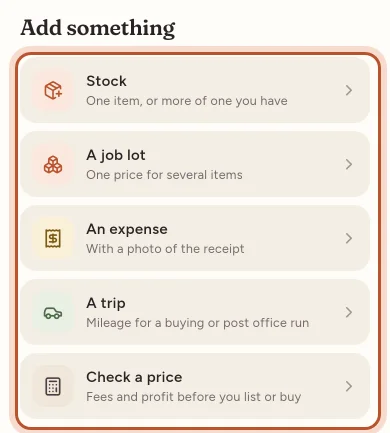
Stock: one item, or more of one you have
Use Stock for one product you bought.
- Enter the SKU. Use the same SKU as on your eBay listing, so sales find this cost. If the SKU is already in stock, the app says so: saving adds to it.
- Enter the Product name, the Quantity and the Total cost: what you paid for all of them, delivery included. The app shows the cost a unit as you type.
- Optionally fill in Bought on, Where you bought it (a shop, car boot, auction or supplier, used by the Sourcing report) and Shelf or location.
- Tap Save inventory.
A job lot: one price for several items
Use A job lot for a box at auction, a house clearance or any purchase where you paid one price for several things.
- Under The purchase, enter the Total paid (including any buyer's premium), Bought on, where you bought it and an optional Receipt or lot number.
- Choose how to Share the price:
- By what each sells for: items you expect to sell for more carry more of the cost. Fairest for mixed lots.
- Evenly per unit: every unit gets the same share.
- I'll enter each cost: you type each cost, and they must add up to the total paid.
- Under What was in it, add each item with its SKU, name, quantity and, for the first option, what it Sells for (each). Each item shows Its share.
- Tap Save purchase.
See Job lots for how the shares work.
An expense, with a photo of the receipt
- Choose a Category and enter the Date paid, a Description (for example "Mailing bags, 500"), who it was Paid to and the Amount paid.
- If only part was for the business, set Business use as a percentage.
- If you are registered for VAT or GST, enter the tax included, or tap Work out to calculate it.
- Under Receipt, tap Take a photo or Choose a photo. Tax offices can ask to see receipts, so it is worth keeping them with the expense.
- For rent, software or a phone contract, set Repeats (every week, month, 3 months or year). It is then added on each due date.
- Tap Save expense.
A trip: mileage for a buying or post office run
This opens Mileage with a new trip ready to fill in: the date, the Business purpose (for example "Sourcing at the car boot sale"), From, To and the Distance one way. Tick There and back to count the distance twice. Tap Save trip. The trip comes off your profit at the mileage rate for your country, or your own rate. See Mileage.
Check a price: fees and profit before you list or buy
This opens the Deal calculator. Enter a Buy price, a Sale price, the postage and any other costs, and it shows the Break-even price, the price for your target profit, margin or ROI, and the Most you can pay for an item to still hit that target. It can use My own fees (from my recent sales) or the published fees for your eBay site. Nothing is saved.
Who can use Quick add
Owners and managers can add everything. Viewers can see figures but not add or change anything, so saving does not work for them. On Home and Stock, the + button is hidden for viewers.
Questions people ask
Where is the + button?
It is the black round button at the top right of Home, Stock and Money. It is there for owners and managers; viewers cannot add anything.
What if I add stock with a SKU I already have?
The app tells you the item is already in stock and how many you have. Saving adds the new units to it as a restock, at the price you paid this time.
Should stock I buy to resell go in as an expense?
No. Add it as stock or a job lot, so it counts as the cost of what you sell. Expenses are for things like packaging, software, postage and travel.
Does Check a price save anything?
No. It opens the Deal calculator, which works out fees, break-even price and profit for a price you are thinking about. Nothing is saved to your sales or stock.
Can I attach a receipt later?
Yes. Open the expense from Money › Expenses, tap it to edit and take or choose a photo. The No receipt filter lists expenses still missing one.
Thanks for telling us.