Using the app offline or with a slow signal
With no signal the ProfitClerk app still opens and shows your saved figures, sales and stock. See what works offline, what needs a connection and how to refresh.
Yes, the app works with no signal or a weak one: it opens straight away and shows your figures, sales and stock from the last time it was connected. Anything that changes data, such as saving an item cost or an expense, needs a connection.
What you see without a signal
- The app opens. It remembers who you are, so it does not wait for the network to start, and no signal never signs you out.
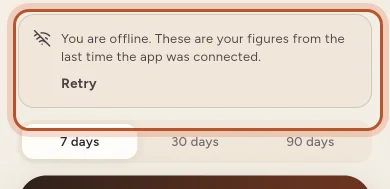
- Home shows your saved figures with a notice: "You are offline. These are your figures from the last time the app was connected." Tap Retry when you have a signal.
- Sales and Stock show the first page of your orders and items from last time.
- Screens you already opened in this session, such as an order or a report, show what they showed before.
Screens you have not opened yet need a connection to load. If one cannot load, you see a message such as "Cannot reach the server. Check your internet." or "Connection timed out. Check your internet." with a Retry button.
What needs a connection
- Saving anything: stock, job lots, item costs, postage, returns, expenses, trips and settings.
- Syncing with eBay.
- Opening the website from the app: eBay and accounting sign-in, imports and downloads.
- Buying a plan.
The app does not queue changes made offline. If saving fails, wait for a signal and save again.
Getting fresh figures
- Pull down on any screen to refresh it. While it refreshes, the list stays on screen with a thin bar at the top, so you do not lose your place.
- Home refreshes itself when you come back to the app after more than two minutes away.
- After you save something, the app forgets what it had remembered for other screens, so they load fresh the next time you open them.
- For new eBay orders now, tap the round arrows button on Home and Sync now.
A slow signal
On a weak connection the app shows what it has at once and swaps in the fresh copy when it arrives. Searches wait until you stop typing before asking the server, and long lists load a page at a time as you scroll.
If something takes too long, the app gives up with "Connection timed out. Check your internet." Move somewhere with a better signal or switch to Wi-Fi, then tap Retry or pull down.
Your saved data and your privacy
What the app remembers stays on the phone, and only for the account signed in. It is wiped when you sign out and when a different account signs in. To sign the app out on a phone you no longer have, use More › Security and sign-in on another phone or Sign out everywhere else.
Questions people ask
Will the app sign me out if I have no signal?
No. The app only signs you out when your sign-in is no longer valid, for example after a password reset. Having no signal never signs you out.
Can I add stock or an expense while offline?
No. Saving needs a connection, and the app tells you it cannot reach the server. Nothing is queued, so add it again when you have a signal.
How do I know I am looking at saved figures?
Home shows a notice saying you are offline and that these are your figures from the last time the app was connected, with a Retry button.
How do I get the newest figures?
Pull the screen down to refresh, or tap Retry on the offline notice. Home also refreshes itself when you come back to the app after more than two minutes.
Is my saved data still on the phone after I sign out?
No. Everything the app remembered is wiped when you sign out, and when someone else signs in on the phone.
Thanks for telling us.