Money in the app: profit and loss, tax and expenses
The Money tab in the ProfitClerk app holds your profit and loss, tax centre, expenses, mileage, eBay payouts, accounting link and fee and sales reports.
The Money tab is your books on your phone. It shows the net profit for a report period after every cost, the Profit and loss line by line, and opens the tax centre, expenses, mileage, eBay payouts, your accounting software and more reports.
Choose a period
The chips along the top choose the report period: This tax year, Last tax year, 3 months, 6 months or 12 months. Your tax year follows your country, set in More › Country and tax. The reports under More reports open on the same period.
Net profit and the profit and loss
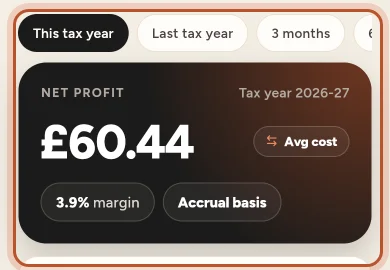
The dark card shows the Net profit for the period with its margin and whether the figures are on a Cash basis or Accrual basis. The Avg cost / FIFO cost pill beside the figure switches how item costs are counted, for the whole app. See Average cost or FIFO in the app.
The Profit and loss panel works it out:
- Sales, less Refunds paid (and, if you are registered, the VAT or GST on your own sales as an estimate), gives Net sales.
- Then the costs: Cost of items sold (or Stock bought on a cash basis), eBay fees, Promoted Listings, Postage labels, Packaging, eBay shop and listing fees, Business expenses, Return postage and Mileage.
- What is left is the Net profit.
The download button on the panel exports the profit and loss in your browser. Below the reports, Profit over time charts your profit across the period.
Books and tax
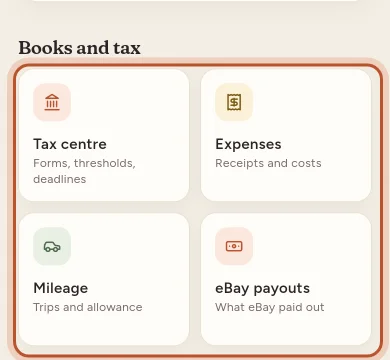
- Tax centre: Tax to put aside, the deadlines Coming up, Thresholds with how close you are and when you may reach them at this pace, and Tax-year exports such as the tax form layout and the bookkeeping journal (they download in your browser). Switch between This tax year and Last tax year. Under Your tax settings you can set your own rate for tax to put aside and turn on email reminders before deadlines and thresholds. See The tax centre.
- Expenses: what the business spent in the period, by category, with search, a No receipt filter, Repeating expenses and Export expenses (CSV). Tap an expense to change it or add a receipt photo. See Expenses.
- Mileage: your business trips and what they are Worth as an expense at the official rate for your country, or your own Rate and unit. Tap Log a trip to add one, and Export log (CSV) for your records.
- eBay payouts: each payout eBay sent to your bank, split into sales, refunds, fees, ad fees, postage labels and other adjustments, and whether it has been posted to your accounting software.
More reports
- Accounting: connect Xero, QuickBooks or FreeAgent to post one summary per eBay payout to your books, see when accounts and tax rates were last read, Read new eBay payouts now, or sign in again when the connection expires.
- eBay fees: every fee, month by month.
- Promoted Listings: ad spend, profit after ads and the return on ad spend.
- Sales tax and VAT: what was collected, and by whom (eBay, or you), by country and region.
- Best sellers & slow movers: what makes you money and what sits on the shelf. Tap an item to open it.
- Breakdowns: revenue, profit, margin and average sale price by Category, Brand, Label or Marketplace.
Questions people ask
Why is net profit on Money lower than on Home?
Home shows profit on your eBay sales only. The profit and loss on Money also takes off business expenses, mileage, return postage and eBay shop and listing fees, for the report period you choose.
What do Cash basis and Accrual basis mean on the card?
They show which accounting basis your profit and loss uses, set in More › Country and tax. On a cash basis the stock line is the stock you bought in the period; on an accrual basis it is the cost of the items you sold.
Can I download the profit and loss from the app?
Yes. Tap the download button on the Profit and loss panel. The file downloads in your browser for the period you have chosen.
Is the tax centre tax advice?
No. The figures are estimates from your eBay data to help you prepare. Check with an accountant or your country's official guidance.
Why does Accounting open my browser?
Xero, QuickBooks and FreeAgent sign-in only works in a browser. After you sign in, tap Back to the app and the app updates by itself.
Thanks for telling us.