Sales and orders in the app
Search and filter your eBay sales in the app, open an order's full profit breakdown, add the item cost, fix postage and record returns from your phone.
The Sales tab lists every eBay order with the profit it made after every cost. Tap an order to see where that profit came from, line by line, and to add the item cost, change the postage or record a return, all from your phone.
The Sales list
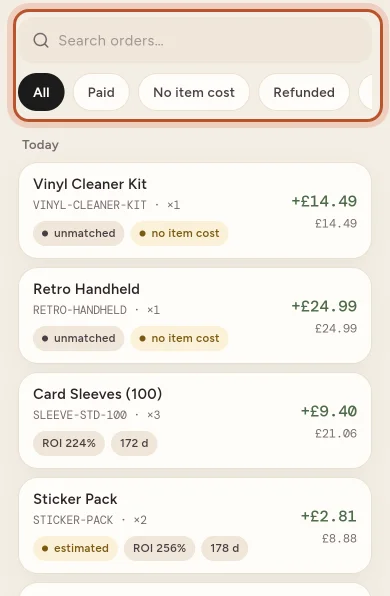
Each order shows the item name, SKU and quantity, its profit on the right (green, or red for a loss) with the sale price under it, and small tags such as the ROI and how many days it took to sell. Orders are grouped by day, with Today and Yesterday at the top.
Tags warn you when something needs a look: no item cost, estimated costs, refunded, partial refund or unmatched.
Search and filters
- Search orders… finds an order by item, SKU, buyer or order number.
- The filters along the top narrow the list: All, Paid, No item cost, Refunded, Partial, Returned and Unmatched.
Pull the list down to refresh it. More orders load as you scroll.
The buttons at the top
- The van button opens To ship: your parcels with their label costs, and eBay Labels charges to check. See Bulk eBay labels.
- The return arrow opens Returns: returns waiting for you on eBay, items back to record, and your return rate and reasons per product. See returns from eBay.
- The sliders button opens Item cost, where you choose Average cost or First in, first out for every figure, and Export (CSV).
An order's page
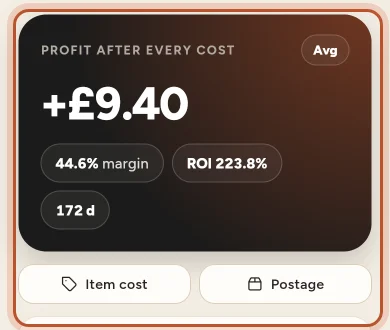
At the top are the item, SKU, quantity and when it sold, then the Profit after every cost card with the margin, ROI and days to sell.
The small Avg or FIFO pill on that card switches the cost method for this order only, so you can compare. It does not change your other figures.
Further down:
- Finance breakdown: money in (item price, postage the buyer paid) and money out (eBay fees, postage label, packaging, the item's cost, refunds), each group with its subtotal, then the Net profit. A cost that is estimated rather than confirmed carries a tag. The label line says where the label cost came from.
- Returns: what came back and what happened to it.
- Finance entries, From eBay: the transactions eBay recorded for the order, with their net. Refresh from eBay fetches them again.
- Order & buyer: the eBay order number (tap the copy button at the top to copy it), the eBay account, the buyer and the delivery address.
Add or change the item cost
If an order has no item cost, a notice says No item cost recorded: its profit leaves out what the item cost you, so it is too high.
- Tap Add the item cost on the notice, or the Item cost button.
- Enter the Cost per unit: what one unit cost you.
- Tap Save.
This changes this sale's profit only. To give future sales of the same SKU a cost, add the item in the Stock tab. See Missing item costs.
Change postage and packaging
Tap Postage to set the Postage label cost and Packaging for the order. Leave the label cost empty to go back to automatic: eBay Labels, or else the postage the buyer paid.
Record a return
- Under Returns, tap Record a return.
- Choose What happened: Back in stock (resellable; the units go back on the shelf), Came back unsellable (the item cost stays a loss) or Not sent back (the buyer kept it).
- Enter the Units, any Return postage you paid, the Date and a Note, then tap Record a return.
Back in stock needs the item in your stock list under the same SKU. To take a return back, tap Undo next to it.
Questions people ask
How do I find sales that have no item cost?
In the Sales tab, tap the No item cost filter. You can also tap Show them on the notice on Home. Their profit is too high until you add the cost.
Does adding an item cost on an order change my stock?
No. The Item cost on an order changes that sale's profit only. To set the cost for future sales of the same SKU, add or restock the item in Stock.
What does the Avg or FIFO pill on an order do?
It switches the cost method for that order only, so you can compare its profit with average cost and with first in, first out. The setting for all your figures is in the sliders button on Sales or the pill on Home.
What happens if I clear the postage label cost?
The order goes back to automatic: the eBay Labels charge if there is one, or else the postage the buyer paid.
Why does an order say Unmatched?
Its SKU did not match any item in your stock, so no cost was found. Add the item in Stock with the same SKU as on eBay, or set the item cost on the order.
Can I export my sales from the app?
Yes. On Sales, tap the sliders button and Export (CSV). The file downloads in your browser, using your current search and filter.
Thanks for telling us.