Managing your stock in the app
Use the Stock tab in the ProfitClerk app to see stock value, restock and edit items, record job lots, find unsold stock and see which sources pay best.
The Stock tab shows what your stock is worth at cost, every item with how many are left, and shortcuts to job lots, unsold stock and the sourcing report. Tap an item to restock it, edit it or see how it sells.
Keeping stock and its cost up to date is what lets every sale show its real profit.
The Stock tab
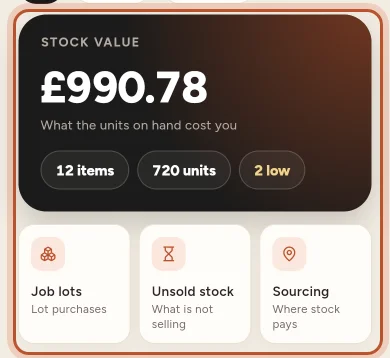
- Stock value: what the units on hand cost you, with the number of items and units, and how many are low.
- Job lots, Unsold stock and Sourcing: three shortcuts under the card.
- Search name, SKU or shelf… finds an item.
- Filters: All, In stock and Low stock.
- The arrows button sorts by Name, Fewest left, Most value or Newest.
Each item shows its name, SKU, units in stock and what each one cost.
Add stock
Tap the + button and Stock, or Add stock when your list is empty. Enter the SKU, name, quantity and the total you paid. Use the same SKU as on your eBay listing, so sales find this cost. Adding to a SKU you already have restocks it. See Quick add.
An item's page
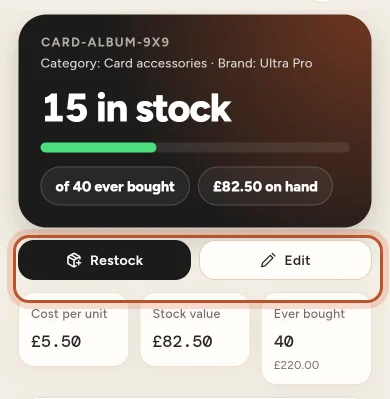
An item shows how many are in stock out of how many you ever bought, the value on hand, and its Cost per unit. Below that:
- How it sells: units sold, ROI, margin and average days to sell, with the fastest and slowest.
- FIFO lots: each purchase with how many units are left and its cost per unit.
- Restocks, units back from a Return, and Changes by hand.
- Product timeline: when it was sourced, listed, relisted, repriced, sold and refunded, with how long it took to sell and how the sale price compared with the first asking price.
Restock an item
- Tap Restock.
- Enter the Units bought and the Total paid, Bought on and, if you like, Where you bought it.
- Save. The new units become a new lot at their own cost.
Edit an item
Tap Edit to change the Product name, SKU and Shelf or location, and its Category, brand and label (used to group your sales in Breakdowns; leave category or brand empty to use eBay's). You can also correct Units on hand after a count. This keeps past profit as it is; say Why it changed in the note.
To remove an item, tap the three dots at the top right of the item and Delete item. Its sales stay in your reports, but they no longer find a cost here.
Job lots
Job lots lists purchases where you paid one price for several items, such as a box at auction or a house clearance. Tap Buy a lot to record one: the total paid is shared out across the items by what each sells for, evenly per unit, or by costs you enter. See Job lots.
Unsold stock
Unsold stock shows what is sitting on the shelf, for how long, and what to do about it: the Money in stock, How old your stock is, and each item's age, when it last sold (or Never sold), its sell-through and whether it is listed. Export (CSV) downloads the list in your browser.
Sourcing
Sourcing shows which places you buy from make you money and how fast that stock sells: what you spent at each source, how many units you bought and sold, what is still on the shelf, the profit and the Return on cost, with your Best source at the top. Each sale counts toward the source of the units it used, oldest stock first. Record where you bought stock when you add or restock it, so this report fills in.
Questions people ask
What is the Stock value figure?
It is what the units you have on hand cost you, added up across all your items. It is not what they might sell for.
Why should the SKU match my eBay listing?
Sales find their cost by SKU. If the SKU in your stock is the same as on the eBay listing, each sale picks up the right cost automatically.
If I change the units on hand, does my past profit change?
No. Changing Units on hand keeps past profit as it is. Add a note under Why it changed so you remember later, for example one broke.
What happens to sales if I delete an item?
The sales stay in your reports, but they no longer find a cost from that item. Only delete items you will not sell again.
What are FIFO lots on an item?
Each purchase or restock of an item is a lot with its own cost per unit. The lots show how many units are left from each, oldest first, which is what the first in, first out method uses.
Thanks for telling us.