Switch between average cost and FIFO in the app
Tap the Avg cost or FIFO cost pill in the ProfitClerk app to switch how item costs are counted. Learn where the switch is and what changes when you use it.
Every profit figure in the app uses one way of counting what your items cost: average cost or first in, first out (FIFO). To switch, tap the small Avg cost pill beside the net profit on Home or Money. It changes to FIFO cost, and every figure reloads with the new method.
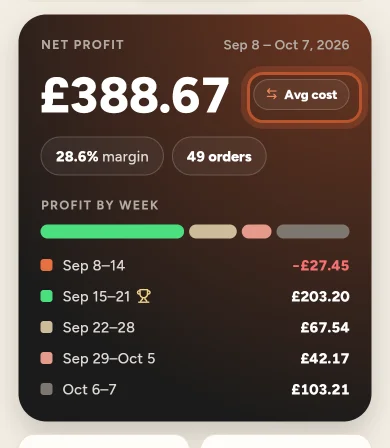
The two methods in one line each
- Average cost (Avg cost): each unit of an item costs the average of everything you paid for it.
- First in, first out (FIFO cost): each sale uses the cost of the oldest units still in stock, lot by lot.
They only give different answers when you bought the same item at different prices. For the full explanation, see Average cost or FIFO.
Where to switch
You can switch in three places, and they all change the same setting:
- Home: the pill beside the big net profit figure. It reads Avg cost or FIFO cost.
- Money: the same pill beside the net profit for the period.
- Sales: tap the sliders button at the top, then choose Average cost or First in, first out under Item cost.
When you switch, Home, Sales and Money reload with the new method. The app keeps your choice between launches, so it is still there the next time you open the app on this phone.
Switching a single order
An order's page has its own small pill on the Profit after every cost card, reading Avg or FIFO. Tapping it switches that order only, so you can see how its profit compares both ways. Your other figures keep the method you chose on Home, Money or Sales.
What changes and what does not
Switching changes:
- the net profit, margin and profit by week on Home
- each order's profit in Sales
- the profit and loss, margin and reports on Money
- the profit on reports opened from Money
Switching does not change:
- your stock, its lots or the costs you entered
- eBay fees, postage, refunds or the sale price
Which should I pick?
Average cost is simple and stays steady. FIFO follows the units you actually sold, which can matter when buy prices change a lot, for example a supplier putting prices up. Use whichever method your accountant or tax return expects, and stick with it so your figures compare from month to month.
Questions people ask
Which one should I use?
Average cost spreads what you paid evenly over every unit of an item; FIFO uses the cost of the oldest units first. If your buy prices change a lot, FIFO follows the actual units more closely. Ask your accountant which one suits your tax return.
Does switching change my data?
No. Your costs, stock and sales stay exactly as they are. The switch only changes how the profit figures are worked out and shown.
Does the website follow the choice I made in the app?
No. The app remembers its choice on this phone. The website has its own switch and starts on average cost.
Why does the switch make no difference for some items?
If you bought every unit of an item at the same price, both methods give the same cost. A difference only appears when units were bought at different prices.
What does the Avg or FIFO pill on an order do?
It switches that one order, so you can compare its profit both ways. Your other figures keep the method you chose on Home, Money or Sales.
Thanks for telling us.