The app shows old figures or does not match the website
If the ProfitClerk app shows old figures or differs from the website, refresh, check your signal, sync with eBay and compare the same period and cost method.
The app shows your figures straight away from what it saved last time, then swaps in fresh ones. If they look old or differ from the website, pull down to refresh. If they still differ, check your signal, the period and the cost method: these explain almost every difference.
1. Refresh
- Pull down on Home, Sales, Stock or Money to load the latest figures.
- Home also refreshes itself when you come back to the app after more than two minutes away.
- After you save anything, the app forgets the other screens' saved copies, so they load fresh next time.
2. Check your signal
With no signal, Home shows "You are offline. These are your figures from the last time the app was connected." with a Retry button. Sales and Stock show the first page from last time. Connect to Wi-Fi or move to a better signal, then tap Retry or pull down. See Using the app offline.
3. Get new orders from eBay
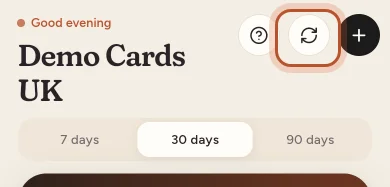
Refreshing loads what ProfitClerk already has. New eBay orders arrive every 15 minutes. To fetch them now, tap the round arrows button at the top of Home and Sync now. If eBay is not syncing at all, see eBay sync stopped.
4. Compare like with like
The period
- The app's Home shows the last 7, 30 or 90 days, picked with the switch above the card.
- The app's Money tab uses a report period: this tax year, last tax year, 3, 6 or 12 months.
- The website's overview and reports have their own date ranges.
Pick the same days in both before comparing.
The cost method
Every profit figure uses average cost or first in, first out (FIFO). The app remembers its own choice on each phone (the Avg cost / FIFO cost pill beside the net profit), and the website has its own switch. If one shows average and the other FIFO, profit can differ for items bought at different prices. See Average cost or FIFO in the app.
Net profit on Home vs Money
Home shows profit on your eBay sales. Money's profit and loss also takes off business expenses, mileage, return postage and eBay shop and listing fees. Both are right; they answer different questions.
5. Figures that change by themselves
Some changes are expected, even when nothing is wrong with the app:
- eBay fees arrive after the order. A new sale's profit drops a little when its fees come in. See eBay fees show as zero.
- Refunds come off when eBay records them.
- The two-year import fills in older months a month at a time while it runs. Home says "Still importing: these figures are not complete yet."
6. Signed in to the right workspace?
The app shows the workspace of the account you are signed in with. If you have more than one account, check the name and email at the top of More.
Still out of date?
Sign out and back in (More › Sign out). This clears everything the app saved on the phone and loads it all fresh. If the figures are still wrong, contact us with a screenshot and the order number or period you are looking at.
Questions people ask
Why does the app not show a sale I can see on the website?
The app may be showing what it saved last time. Pull down on Sales or Home to refresh. If the sale is not on the website either, it has not synced from eBay yet.
Why is net profit different in the app and on the website?
Check that both use the same period and the same cost method. The app's Home shows 7, 30 or 90 days and remembers its own Avg cost or FIFO choice; the website has its own switch.
Does pulling down to refresh sync with eBay?
No. Pulling down fetches the latest figures from ProfitClerk. To ask eBay for new orders now, tap the round arrows button on Home and Sync now.
I changed something on the website. When does the app show it?
Next time the screen loads. Pull down to refresh, or leave the app for more than two minutes and Home refreshes itself when you come back.
Thanks for telling us.