I can't sign in – fixes for common problems
Can't sign in to ProfitClerk? Reset your password, fix a wrong two-step code, use a recovery code, sign in with Google or Apple, or confirm your email address.
Most sign-in problems come down to four things: a mistyped email or password, a two-step code that does not match, signing in a different way from the one you signed up with, or an email address that has not been confirmed yet. Find your message or situation below.
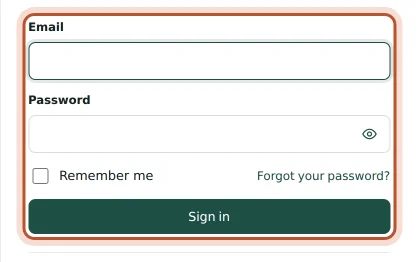
"These credentials do not match our records"
The email and password do not match an account.
- Check the email for typos, and that it is the one you signed up with.
- Check Caps Lock, and use Show password to see what you typed.
- If you signed up with Google (or Apple in the iPhone app), use Continue with Google or Continue with Apple instead of a password.
- Still no luck? Reset your password (below).
Reset your password
- On the sign-in page, click Forgot your password? (in the app, tap Forgot your password? under the password).
- Enter your email and send the link.
- Open the email and click the link. It works for 60 minutes.
- Choose a new password. On a phone, the page offers Back to the app.
You always see the same message, whether or not an account uses that email, so nobody can find out who has an account. If the email does not arrive, see Emails not arriving.
Resetting your password signs you out everywhere else, including the app on other phones. Sign in again with the new password.
"Too many login attempts"
After several wrong attempts, signing in is paused briefly. The message says how many seconds to wait. Wait, then try once more, or reset your password.
Two-step code not accepted
If you turned on two-step sign-in, you enter a 6-digit code from your authenticator app after your password.
- "That code is not right." Codes depend on the time. Check your phone's date and time are set automatically, then type the newest code before it changes.
- The code is for the wrong account. If your authenticator app holds several accounts, use the one named ProfitClerk.
Lost your phone or authenticator app
- On the code screen, click Lost your phone? Use a recovery code.
- Enter one of the recovery codes you saved when you turned on two-step sign-in. Each code works once.
- Once in, go to security settings (More › Security and sign-in in the app) and set up two-step sign-in on your new phone, and make New recovery codes.
If you have no recovery codes left, contact us: support can reset two-step sign-in so you can set it up again. See Two-step sign-in.
Google or Apple sign-in does not work
- "Google sign-in did not work." Try again, or use your email and password.
- "Your browser blocked the Google window." Allow pop-ups for the site and try again.
- Apple on Android or the website. Sign in with Apple is offered in the iPhone app only. Elsewhere, use your email: if you never set a password, use Forgot your password? to choose one.
- "No ProfitClerk account uses … yet." The Google or Apple account has a different email from your ProfitClerk account. Use the email you signed up with, or create a new account only if you meant to.
Asked to confirm your email
New accounts may need to confirm their email before going further. Open the link we sent; in the app, tap I've confirmed it afterwards. Did not get it? Use Send the email again, check spam, or Wrong address? Change it. If the link says it is not valid or has expired, sign in to get a new one.
Signed out unexpectedly
You are signed out when your password changes or someone uses Sign out everywhere else: "You were signed out because your password changed or you signed out of other browsers." If you did not do this, sign in, change your password and check Recent sign-in activity in your security settings.
Workspace paused
If you can sign in but see This workspace is paused, the workspace is suspended and its data cannot be opened. Use Contact support on that screen.
Questions people ask
It says these credentials do not match our records.
The email or password is wrong. Check the email for typos, then reset your password with Forgot your password. If you signed up with Google or Apple, use that button instead.
It says too many login attempts.
After several wrong tries, signing in is paused for a short time. Wait the number of seconds shown, then try again, or reset your password.
My two-step code is always wrong.
Make sure your phone's time is set automatically, and type the newest code before it changes. If it still fails, use one of your recovery codes.
I lost my phone and my recovery codes.
Contact support from the contact form. Support can reset two-step sign-in for your account so you can set it up again.
The app signed me out by itself. Why?
The app only signs you out when your sign-in is no longer valid, for example after a password reset or after Sign out everywhere else. Sign in again with your new password.
Thanks for telling us.