How to contact support
Contact ProfitClerk support from the website or the app. Pick the right topic, include what helps us answer quickly, and expect a reply by email.
To contact ProfitClerk support, use the Contact us form: on the website from the Contact link, or in the app from More › Contact support. Choose a topic, write your message, and we reply by email, usually within one working day.
Before you write, a quick look at the troubleshooting articles may solve it faster: profit looks wrong, a sale is missing, eBay sync stopped and I can't sign in cover the most common questions.
Send a message on the website
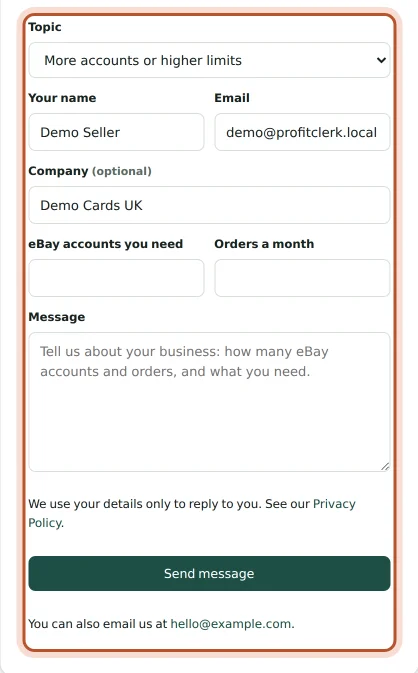
- Open the Contact page (linked at the bottom of the website). It works whether or not you are signed in.
- Choose a Topic (see below).
- Enter Your name and Email, and your company if you like.
- Write your Message and click Send message.
You see "Thanks, we have your message" and we email you a copy.
Send a message in the app
- Open More › Contact support.
- Under What is it about?, choose Help, More accounts, Privacy or Other.
- Write Your message (at least 10 characters) and tap Send message.
When you are signed in, the app sends your name and email from your account, so you only need to write the message.
Choosing a topic
- Help with my account (Help in the app): something is not working, a figure looks wrong, or you cannot find something.
- More accounts or higher limits (More accounts): you need more eBay accounts, orders or team members than the plans offer. Fill in eBay accounts you need and Orders a month, and we set up a plan around your business. See More eBay accounts or higher limits.
- Privacy or my data (Privacy): a copy of your data, a correction or deletion, or a question about how your data is used.
- Something else (Other): anything else, including feedback and ideas.
What to include
The more precise the message, the faster the answer. Please include:
- the email address your account uses, if you are not signed in
- the eBay order number, for a question about one sale
- the SKU and item, for a question about stock or costs
- the eBay account name, if you have several
- what you expected to see, what you saw, and any message shown on screen
- whether it happens on the website, the iPhone app or the Android app
- for a problem with eBay syncing, the Last error shown in Settings
Things you can do yourself
- Reset your password: Forgot your password? on the sign-in page.
- Download your data: More › Legal & privacy › Download my data in the app, as a JSON file.
- Delete your account: More › Delete account in the app. Owners delete the whole workspace: orders, stock, the eBay connection and the team. This cannot be undone.
- Change your plan or cancel: More › Your plan in the app, or Billing on the website.
If your workspace is paused
If you see This workspace is paused, your workspace is suspended and its data cannot be opened. Tap Contact support on that screen and we will help you get it back.
If you cannot sign in
The contact page on the website does not need you to be signed in. Use the email address your account uses, describe what happens when you try to sign in, and see I can't sign in for quick fixes in the meantime.
Questions people ask
How quickly do you reply?
We read every message and reply by email, usually within one working day.
Can I contact you if I cannot sign in?
Yes. The contact page on the website works without signing in. Give the email address your account uses so we can find it.
I need more eBay accounts or higher limits. Who do I ask?
Choose the More accounts or higher limits topic and tell us how many eBay accounts, orders a month and team members you have. We set up a plan around them.
How do I ask for a copy of my data or to have it deleted?
Choose the Privacy or my data topic. You can also download a copy yourself from More › Legal & privacy › Download my data in the app, and delete your account under More.
Did my message arrive?
After sending, you see that we have your message, and on the website we email you a copy. If the copy does not arrive, check your spam folder.
Thanks for telling us.