I can't make changes or save anything
Buttons missing or saving sends you to the plans? Your workspace may be read-only without a plan, your team role may be viewer, or a plan limit is hit.
If you cannot add, edit or save anything in ProfitClerk, there are three likely reasons: the workspace has no active plan and is read-only, your team role is viewer (or the action is for the owner only), or a plan limit has been reached. The message you see tells you which.
1. The workspace has no active plan
Without an active plan, a workspace is read-only. This happens before a plan is chosen, after a plan or pass ends, or when a cancelled plan reaches the end of its period.
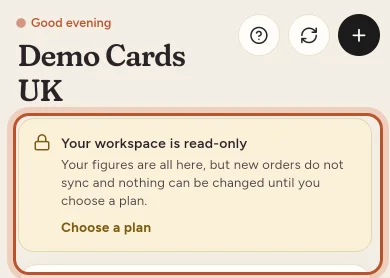
What you see:
- Website: anything that changes data sends the owner to the plans page; team members go to the overview with a note. "This needs an active plan. Your figures stay here to look at; choose a plan to sync orders and make changes."
- App: Home shows Your workspace is read-only: "Your figures are all here, but new orders do not sync and nothing can be changed until you choose a plan." Saving opens the plans.
What still works without a plan:
- opening every page: old orders, stock, reports
- downloading exports
- your profile, security, sign-out, billing, legal pages and the contact form
- taking things away: disconnecting eBay or accounting software, removing a teammate
Fix: the owner chooses a plan (Billing on the website, More › Your plan in the app). Team members see "This workspace has no active plan, so it is read-only for now. Ask the workspace owner to choose a plan." See Read-only without a plan.
2. Your role does not allow it
Every team member has a role:
- Owner: everything, including eBay accounts, the plan, team members and country and tax settings.
- Manager: adds and changes stock, costs, expenses and trips. Managers can also connect accounting software and import costs and label costs.
- Viewer: sees everything, changes nothing.
As a viewer, the add, edit and sync buttons are hidden, both on the website and in the app. On the website, opening a change directly shows "This action requires one of these roles: …".
As a manager, owner-only screens say so, for example "Only the workspace owner can connect or change eBay accounts." or "Only the workspace owner can change these."
Fix: ask the workspace owner to change your role in Team (More › Team members in the app). See Team roles.
3. A plan limit is reached
Plans have limits on SKUs, team seats, eBay accounts and orders a month. When you hit one, the action stops with a message such as "You've reached the … SKU limit on the … plan. Upgrade to add more inventory." In the app, the plans open with Your plan's limit is reached.
Fix: upgrade the plan, or make room (for example, remove a teammate or an eBay account you no longer use). The monthly order limit resets at the start of your next month. See Usage limits.
4. Other reasons
- The workspace is paused. If you see This workspace is paused, it is suspended and its data cannot be opened. Contact support.
- Updated terms. If the terms changed, you are asked to agree before carrying on: We have updated our terms.
- Email not confirmed. New accounts may need to confirm their email first. See Emails not arriving.
- No connection (app). Saving needs a signal. The app says it cannot reach the server; try again when you are connected.
Still stuck? Contact us and say what you were trying to change and the message you saw.
Questions people ask
Why does saving open the plans page?
Your workspace has no active plan, so it is read-only. Your figures are all there to look at, but syncing and changes need a plan. Only the owner can choose one.
Why can I see figures but not the Add or Edit buttons?
You are probably a viewer in this workspace. Viewers see everything but change nothing. Ask the owner to make you a manager.
I am a manager. Why can't I connect eBay or change the plan?
Some things are for the owner only, such as eBay accounts, the plan, team members and the country and tax settings. Ask the workspace owner.
It says I've reached a limit. What does that mean?
Your plan has a limit on SKUs, team seats, eBay accounts or orders a month, and it has been reached. Upgrade the plan, or remove something to make room.
Can I still download my data without a plan?
Yes. Without a plan you can still open every page, see old orders and reports, and download exports. Account settings, security and billing stay open too.
Thanks for telling us.