eBay sync stopped or needs reconnecting
New eBay orders not coming in, an Error badge or an email saying your account is not syncing? Reconnect eBay in Settings or the app and catch up on orders.
When eBay stops accepting ProfitClerk's access to your account, new orders, fees and refunds stop coming in. The fix is almost always to reconnect: sign in to eBay again from Settings on the website (More › eBay accounts in the app) and allow access. Everything missed then catches up.
How you know sync has stopped
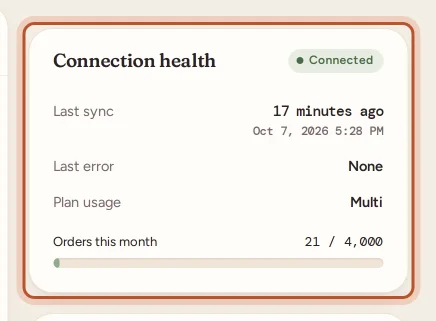
- The account shows an Error badge in Settings, with a Last error from eBay.
- Last sync says a long time ago.
- You get an email, "Your eBay account … is not syncing", after the account has failed to sync for over an hour (once per problem).
- If notifications are on, your phone shows eBay sync needs attention.
- No new sales appear, though you are selling on eBay.
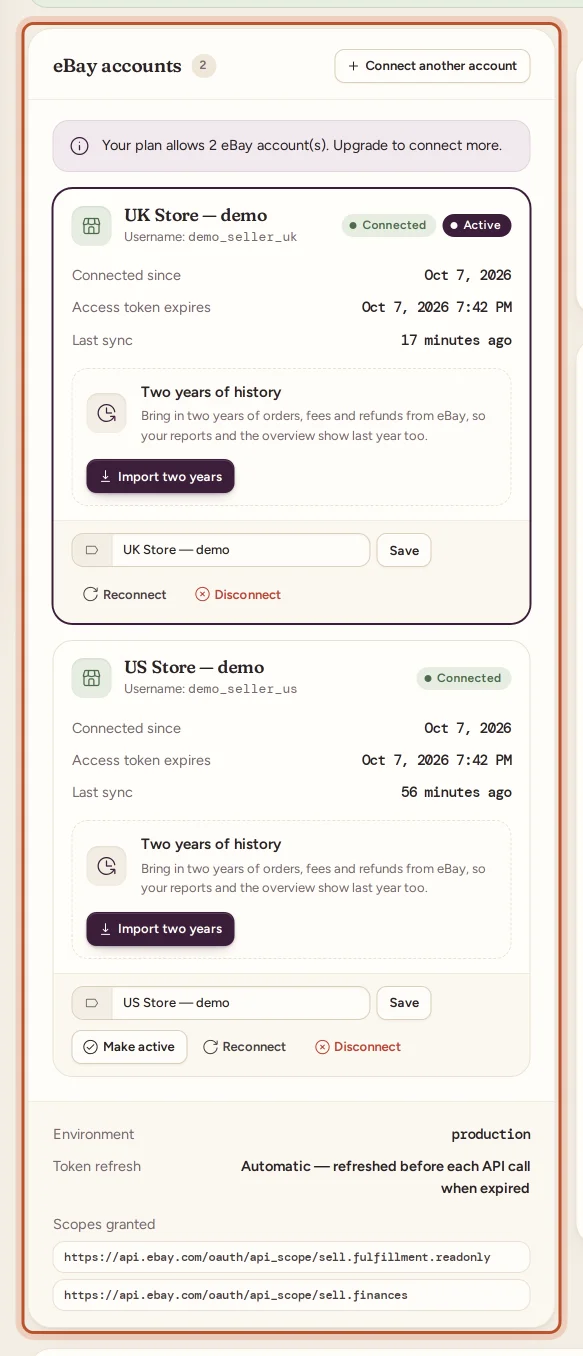
Reconnect on the website
- Open Settings.
- Under eBay accounts, find the account with the Error badge.
- Click Reconnect.
- Sign in to eBay and allow access. You come back to ProfitClerk with "eBay account connected (read-only)."
Reconnect in the app
- Open More › eBay accounts.
- Tap the account, then Sign in to eBay again.
- Your browser opens eBay's sign-in. Sign in and allow read-only access.
- Tap Back to the app. The app checks again and shows the account as connected.
After reconnecting
- New orders come in on the next sync, within 15 minutes. Use Sync now to fetch them straight away.
- Fees and refunds for the gap catch up as eBay's finance data is read again.
- If any orders from the gap are still missing, use Re-import missed orders (Settings › Sync, up to 90 days; in the app, the sync button on Home, 1, 2 or 7 days). Sync now only looks at orders changed since the last successful sync, so it may not go back far enough.
Why eBay stops accepting the connection
- You changed your eBay password or security settings.
- You removed ProfitClerk's access in your eBay account's settings.
- eBay ended the authorisation, as it does from time to time.
ProfitClerk refreshes its access to eBay automatically before each request, so a connection normally keeps working on its own until one of these happens.
When sync is paused for another reason
Not every pause is a connection problem. In these cases the account stays Connected but new orders still do not come in:
- No plan, or the plan has ended. The workspace is read-only and does not sync. See Read-only without a plan.
- The monthly order limit is used up. New orders wait until next month or a plan change; existing orders keep updating. See Usage limits.
- eBay's call limit is reached. eBay limits how many requests can be made a day. The sync tries again later by itself; nothing is lost.
- The workspace is suspended. Contact us to get it back.
Disconnecting instead
If you no longer sell on an account, Disconnect it. Its orders stay in your reports; new orders from it stop coming in until you connect it again.
Still stuck after reconnecting? Contact us with the eBay account name and the Last error shown in Settings.
Questions people ask
Why did eBay stop syncing?
Usually because eBay no longer accepts the sign-in you gave ProfitClerk, for example after you changed your eBay password, removed ProfitClerk's access in your eBay account, or eBay ended the authorisation. Reconnecting fixes it.
Will I lose orders while it was not syncing?
No. Once it works again, new orders, fees and refunds catch up. If anything is still missing, use Re-import missed orders, which looks back up to 90 days.
Who can reconnect an eBay account?
Only the workspace owner. Managers and viewers can see the account's status but cannot connect, reconnect or disconnect it.
Does reconnecting change anything on eBay?
No. ProfitClerk only reads your orders, fees and payouts. It never lists, changes or ends anything on eBay.
The account says Connected but nothing new comes in. What else can it be?
Check that the workspace has a plan, that the monthly order limit is not used up, and that the sale was on this eBay account. Then try Sync now.
Thanks for telling us.