Notifications are not arriving on my phone
Not getting sale, refund or payout notifications from the app? Check your phone's settings, More › Notifications, your role and that you're signed in.
If notifications from ProfitClerk are not reaching your phone, it is usually one of three things: the phone is not allowing them, that kind of notification is switched off in More › Notifications, or it goes to someone else in the workspace (most go to the owner). Work through the checks below.
1. Is the phone allowing them?
Open More › Notifications in the app. If you see Notifications are off on this phone, the phone is blocking them.
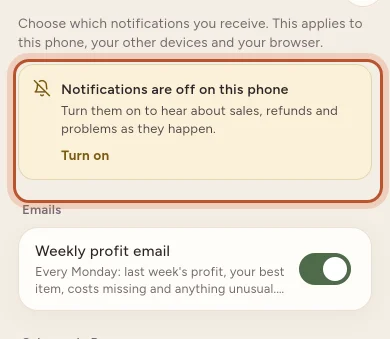
- Tap Turn on and allow them in the box that appears.
- On iPhone, if you said no before, the button says Open Settings. Turn on Allow Notifications, then come back to the app.
Or from the phone's settings:
- iPhone: Settings › ProfitClerk › Notifications, then Allow Notifications.
- Android: Settings › Apps › ProfitClerk › Notifications, and make sure they are on.
Coming back to the app after switching them on is enough: the app starts receiving them.
2. Is that kind switched on?
In More › Notifications, each kind has its own switch: New sale, Refund on an order, eBay payout sent, eBay sync problem, Tax reminders and more. Switch on the ones you want. Your choices apply to every phone and browser you use with ProfitClerk, so switching one off elsewhere switches it off here too.
If saving fails, you see "Could not save. Check your connection and try again."
3. Is it meant for you?
Notifications about sales, refunds, payouts, eBay, accounting software, tax and your plan go to the workspace owner. Managers and viewers get the alerts about their own account (a sign-in from a new device, a password change) and news. If you are not the owner, you will not get sale notifications.
4. Is the phone signed in?
Notifications go to phones where the app is signed in. Signing out removes the phone. If you reinstalled the app or got a new phone, sign in and open the app once. Then check More › Notifications again.
5. Are new orders coming in?
A New sale notification is sent when the order arrives from eBay, which happens every 15 minutes. If eBay is not syncing, no sale notifications are sent either. Check More › eBay accounts for a problem, and see eBay sync stopped.
Some things are expected:
- A burst of sales gives notifications for up to ten new orders per sync. All sales are still in Sales.
- Profit missing from a notification means eBay's fees were not in yet. See eBay fees show as zero.
- Each sale is notified once, even if the order is updated later.
6. Phone settings that hide notifications
- Focus or Do Not Disturb (iPhone) and Do not disturb (Android) silence notifications. Check whether one is on, or add ProfitClerk to the allowed apps.
- Battery saving on some Android phones stops apps from receiving notifications in the background. Set ProfitClerk to Unrestricted (or not optimised) in the phone's battery settings.
- Notification summary (iPhone) can hold notifications until a set time.
What you see when one arrives
On Android, a notification that arrives while the app is open shows as a banner inside the app; on iPhone, the phone shows its usual banner. Tap it to open the order or the right tab.
Still nothing?
If the phone allows notifications, the switches are on, you are the owner and new orders are syncing, contact us with your phone model and whether it is iPhone or Android. Emails about important problems, such as an eBay sync problem, are sent as well, so check your inbox too.
Questions people ask
I turned notifications on but get none for new sales.
Check that New sale is switched on in More › Notifications, that you are the workspace owner, and that new orders are syncing. Sale notifications go to the owner, as orders arrive from eBay.
Why does a sale notification show no profit?
The profit is only included once eBay's fees for the order are in. A notification sent before that shows the sale price and item only.
I made lots of sales at once but got fewer notifications.
To avoid a flood, each sync sends notifications for up to ten new orders. Every sale is still in Sales.
I said no to notifications on my iPhone. Can I change my mind?
Yes. Open Settings › ProfitClerk › Notifications on your iPhone and turn on Allow Notifications, or tap Open Settings in More › Notifications.
Do I get notifications on a phone I signed out of?
No. Signing out removes the phone, so it stops getting notifications. Sign in again to start them.
Thanks for telling us.