Why my numbers differ from eBay's Seller Hub
Sales or fees in ProfitClerk not matching eBay Seller Hub? See what each includes: sales tax, postage, refunds, dates, fees, label costs and multiple accounts.
ProfitClerk and eBay's Seller Hub count different things. Seller Hub shows what buyers paid and what eBay is paying you; ProfitClerk works out what you kept after every cost, and leaves out money that was never yours, such as sales tax eBay collected. When the two disagree, it is almost always one of the reasons below.
Sales tax eBay collects
In many countries and US states, eBay collects sales tax or VAT from the buyer and pays it to the tax authority itself. That money passes through the order but is not yours to pay and not your income, so ProfitClerk leaves it out of your sales and profit. Seller Hub totals can include it.
You can see what was collected, and by whom, in the Tax collected report under Reports (in the app Money › More reports › Sales tax and VAT): Collected and paid by eBay is shown separately from Collected by you.
What counts as a sale
In ProfitClerk, an order's gross sale is the item price plus the postage the buyer paid. Then:
- Refunds come off when eBay records them. A cancelled order shows as refunded.
- eBay fees come off, from eBay's own finance data.
- Your costs come off: the label cost, packaging and what the item cost you.
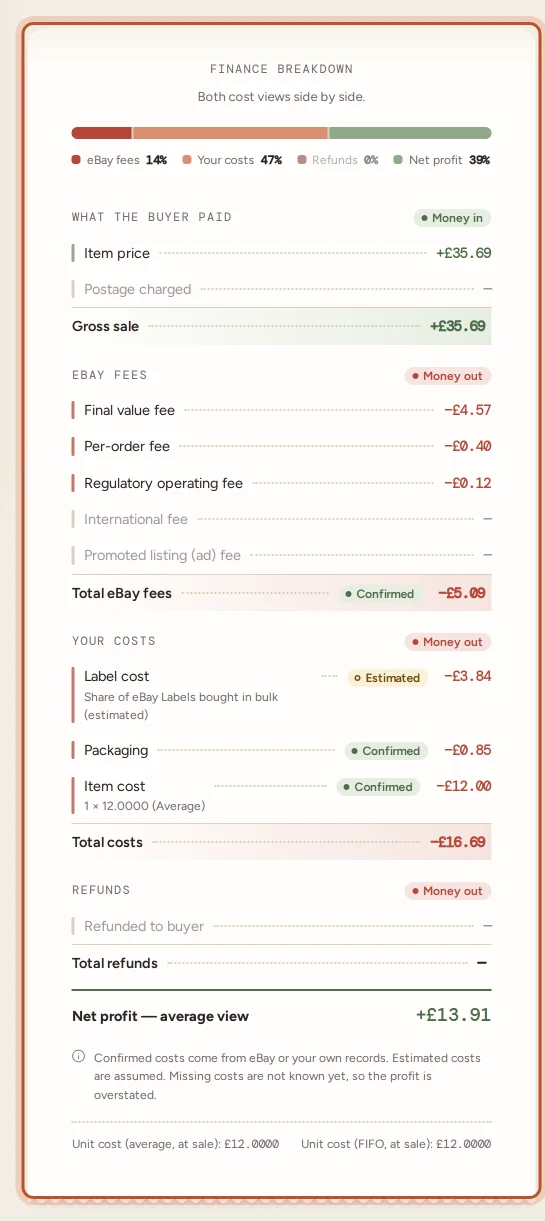
Seller Hub's sales figures do not take off your item costs, label costs you paid elsewhere or packaging, so its numbers are bigger than ProfitClerk's profit by design.
Dates
ProfitClerk dates each sale by when it sold. Seller Hub has several views (when the order was paid, when a transaction was posted, when a payout was sent), and a sale on the last evening of a month can fall into different months. Compare the same date range, and remember ProfitClerk's periods follow your settings, such as your tax year.
Fees
- Not in yet. A new order's fees arrive with eBay's finance data, often later. Until then they show as Missing. See eBay fees show as zero.
- Multi-item orders. ProfitClerk stores one line per item and shares the order's fees across them by sale. Compare the whole order, not one line.
- Fees not tied to an order. Your shop subscription and other account charges are in the profit and loss as eBay shop and listing fees, not on orders.
- VAT on fees. Depending on your eBay account type, VAT on eBay's fees may be included in the fees or added on top. It is shown on the order's fee breakdown.
If an order shows eBay's figure for this order differs, click Refresh finance entries on the order and compare again.
Payouts
A payout is the money eBay sent to your bank. It groups many transactions by when eBay paid them, and it is net of fees, refunds and eBay postage labels, but not of your item costs or expenses. eBay payouts in ProfitClerk splits each payout into sales, refunds, fees, ad fees, postage labels and other adjustments. Any amount eBay's transactions do not explain is shown as Not explained by eBay's transactions. See eBay payouts.
Accounts
ProfitClerk includes every eBay account you have connected, together. Seller Hub shows one account at a time. Use the Account filter on Orders to compare a single account, and check every account you sell on is connected in Settings.
Orders that are not in yet
New orders arrive every 15 minutes, and older sales only if you ran the two-year import. If Seller Hub has a sale ProfitClerk does not, see A sale is missing.
US sellers and the 1099-K
If you are in the US, the tax centre can compare your Form 1099-K with your sales in ProfitClerk: enter box 1a and box 3, and it tells you whether they match, with and without the sales tax eBay collected. Refunds and fees are not taken off the 1099-K.
Questions people ask
Why are my sales lower in ProfitClerk than in Seller Hub?
Sales tax that eBay collects from buyers and pays itself is not your income, so ProfitClerk leaves it out of your sales and profit. Seller Hub totals can include it. Refunds and the date range can also explain a gap.
Why is my payout different from my profit?
A payout is the money eBay sent to your bank for a batch of transactions. It has had fees and refunds taken off but not your item costs, postage you bought elsewhere or expenses, and it groups sales by when eBay paid, not when they sold.
Why do the fees on an order differ from Seller Hub?
The fees may not be in yet, or the order has several items and its fees are shared across the item lines. Refresh the finance entries on the order and compare the total for the whole order.
Does ProfitClerk include all my eBay accounts?
Only the accounts you have connected. Seller Hub shows one account at a time, so compare like with like, and use the Account filter on Orders.
Which figure should I use for my tax return?
Ask an accountant or check your country's official guidance. The tax centre and profit and loss are there to help you prepare, not to replace advice.
Thanks for telling us.