My profit looks wrong – what to check
Profit too high, too low or different from what you expected? Check missing item costs, estimated label costs, fees not final yet, refunds and cost method.
When a profit figure looks wrong, it is almost always because one of the costs behind it is missing or estimated: an item with no cost, a label cost guessed from the postage charged, or eBay fees that have not arrived yet. ProfitClerk tags every cost so you can find these quickly and fix them.
Work through the checks below in order. Most problems are solved by the first two.
1. Sales with no item cost
If ProfitClerk does not know what an item cost you, the sale's profit leaves that cost out, so it is too high. These orders are also left out of your margin until they have a cost.
You will see:
- on the overview and on Home in the app, a notice with the number of orders with no item cost
- on the order, a No item cost recorded warning

Common causes:
- The SKU matched no inventory item. The order says "The SKU … matched no inventory item." and shows as unmatched. Add the item to Inventory with exactly the same SKU as on your eBay listing.
- The matched item has no cost. Edit the item in Inventory and enter what it cost.
- The listing has no SKU. Set the cost on the order itself.
To fix one order, enter the cost per unit in the warning and save (on the website Set cost; in the app Add the item cost). To fix many, filter Orders by No item cost or use Import item costs. See Missing item costs.
2. Estimated costs
A cost is estimated when ProfitClerk had to assume it:
- Label cost estimated from postage charged. With no eBay Labels charge, no imported label cost and nothing typed in, the label cost is assumed to equal the postage the buyer paid. If you posted more cheaply, or bought labels elsewhere, profit is off. Enter the real cost on the order, or import your label costs. See Label cost looks wrong.
- A share of eBay Labels bought in bulk. The charge was shared over several orders automatically. Check it under Label charges to check.
- Item cost estimated. More units sold than your recorded stock, so the extra units use the average cost. Restock the item with the units you really bought.
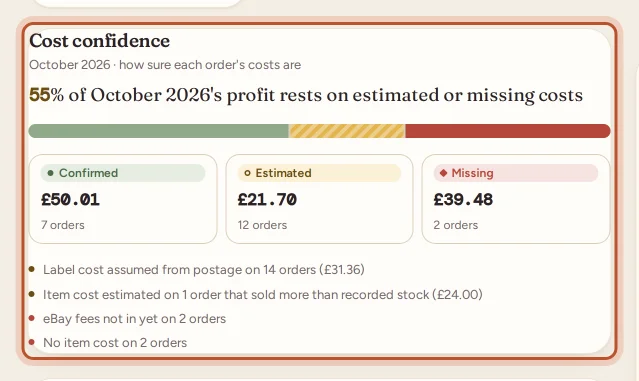
The overview's cost confidence card shows how much of your profit rests on estimated or missing costs. See Cost confidence.
3. eBay fees not final yet
eBay's fees come from its finance data, which can arrive after the order itself. Until then the fees on the order are Missing ("Waiting for eBay's finance data") and the profit is too high. ProfitClerk checks eBay's finances regularly through the day and re-reads the last 30 days every night, so this usually sorts itself out. See eBay fees show as zero.
4. Refunds and returns
A refund to the buyer comes off the sale's profit when eBay records it. If you refunded outside eBay, or the buyer sent the item back, record the return on the order, so stock and profit stay right: Back in stock, Came back unsellable or Not sent back. Return postage you paid can be added too.
5. The cost method
Profit can be shown with average cost or first in, first out (FIFO). If you bought the same item at different prices, the two give different profits. Check which one you are looking at: the switch is on the overview and order pages, and the Avg cost / FIFO cost pill in the app. See Average cost or FIFO.
6. eBay's figure differs
If an order shows eBay's figure for this order differs, eBay's own earnings for the order do not match the breakdown. Use Refresh finance entries on the order (Refresh from eBay in the app) to fetch the latest fees and refunds, then compare with the order in Seller Hub.
Still not right?
Open the order and read the Finance breakdown line by line: every amount between what the buyer paid and what you kept is there, with a tag on anything estimated or missing. If a line still looks wrong, contact us with the eBay order number.
Questions people ask
Why is my profit higher than I expected?
The most common cause is a sale with no item cost, so the cost of the item is left out. eBay fees that have not arrived yet, or a label cost guessed from the postage the buyer paid, can also make profit look too high.
Why did an order's profit change a day after the sale?
eBay's fees and refunds come from its finance data, which can arrive after the order. When they do, the order is worked out again with the real figures.
Why do Home and the Money tab or profit and loss show different profit?
The overview shows profit on your eBay sales. The profit and loss also takes off business expenses, mileage, return postage and eBay shop and listing fees, and may cover a different period.
Why does the same order show two different profits?
You may be looking at it with average cost in one place and FIFO in another. The order page lets you switch between them; both are correct for their method.
How can I see which orders need attention?
Filter Orders by No item cost, or by Confidence (Estimated or Missing). The overview's cost confidence card also shows how much of your profit rests on estimated or missing costs.
Thanks for telling us.