A sale is missing from my orders
An eBay sale not showing in ProfitClerk? Check sync timing, the date range and account filter, which eBay account sold it, your plan, and re-import missed orders.
If an eBay sale is not in ProfitClerk, it is usually one of four things: it sold in the last few minutes and has not synced yet, a filter on the Orders page is hiding it, it was sold on an eBay account that is not connected, or syncing is paused by your plan. Check them in this order.
1. Has it had time to sync?
ProfitClerk asks eBay for new and changed orders every 15 minutes. A sale made a few minutes ago may simply not be in yet.
To fetch it now:
- Website: Sync now on the Overview page or in Settings › Sync.
- App: the round arrows button at the top of Home, then Sync now.
2. Is a filter hiding it?
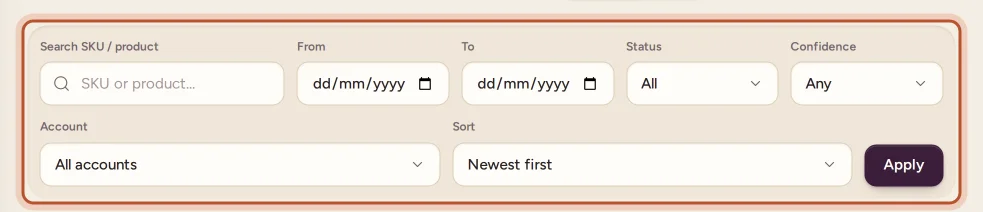
On the Orders page, check:
- the From and To dates: the sale date must be inside them
- the status filter (All, Paid, Refunded, Partial refund, Unmatched) and the Item cost and Confidence filters
- the Account filter, if you have more than one eBay account
- the search box: clear it
In the app, check the filter chips on Sales and clear the search.
3. Was it sold on a connected eBay account?
Every eBay account you sell on has to be connected. Open Settings (in the app More › eBay accounts) and check that the account is listed and shows Connected, not Error.
If the account shows an error, or its Last sync is long ago, sign in to eBay again with Reconnect (in the app Sign in to eBay again). See eBay sync stopped.
4. Is your plan letting new orders in?
- No plan, or the plan has ended: the workspace is read-only, and new orders do not sync until a plan is chosen. See Read-only without a plan.
- Monthly order limit reached: new orders wait until next month or until you change plan. Orders you already have keep their fees and refunds up to date. The owner gets an email and, if switched on, a notification. See Usage limits.
5. Was it missed during an outage?
Sync now only asks eBay for orders changed since the last successful sync. If syncing was interrupted, for example while an account needed reconnecting, a gap can be skipped and pressing Sync again will not go back far enough.
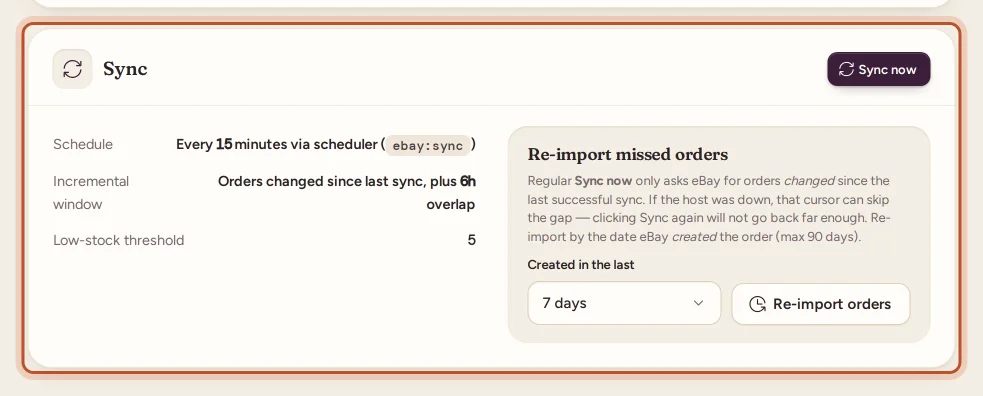
Use Re-import missed orders instead:
- Website: Settings › Sync, choose how far back under Created in the last (up to 90 days) and click Re-import orders.
- App: the sync button on Home, then under Re-import missed orders pick 1 day, 2 days or 7 days.
Orders already in ProfitClerk are updated, not doubled.
6. Is it older than your account?
When you connect eBay, recent orders come in. For sales from before that, use the two-year import: it brings in two years of orders, fees and refunds, a month at a time, and your figures fill in as it goes. Start it from Settings or More › eBay accounts; it is included on some plans only. See See your last two years.
What does not show as a separate sale
- A cancelled order shows as refunded, not as a separate status.
- An eBay order with several items is stored as one line per item, with the same eBay order number.
Still missing?
If the sale is in Seller Hub, the account is connected and a re-import did not bring it in, contact us with the eBay order number and the account it sold on.
Questions people ask
How long does it take for a new sale to show?
ProfitClerk checks eBay for new and changed orders every 15 minutes, so a sale normally appears within about a quarter of an hour. Use Sync now to fetch it straight away.
I clicked Sync now but an older order is still missing. Why?
Sync now only asks eBay for orders changed since the last successful sync. If orders were missed during an outage, use Re-import missed orders, which looks back by the date eBay created the order.
Can I bring in sales from before I joined?
Yes, on plans that include it. The two-year import in Settings (More › eBay accounts in the app) brings in two years of orders, fees and refunds from eBay.
I sell on two eBay accounts. Do both sync?
Every connected account syncs. Check that the account that made the sale is connected in Settings, and that the Orders page's Account filter is not set to the other one.
Why do new orders stop near the end of the month?
Your plan's monthly order limit may be used up. New orders then wait until next month or until you change plan; orders you already have keep updating.
Thanks for telling us.