Emails from us are not arriving
Password reset, confirm email or team invitation email not arriving? Check spam, the address on your account, send it again, and use the link options.
If an email from ProfitClerk has not arrived, look in your spam, junk or promotions folder first, then check that the email address on your account is right. For the confirmation and password emails you can ask for a new one, change the address, or carry on another way.
1. Check spam and other folders
Most missing emails are in:
- Spam or Junk
- Promotions or Updates tabs (Gmail)
- Other (Outlook's Focused inbox)
- a filter or rule that moves mail to a folder
If you find one there, mark it as not spam and add the sender to your contacts, so the next ones go to your inbox.
2. Check the address
- Confirm your email: the screen shows the address we sent to. If it is wrong, tap Wrong address? Change it and enter the right one. The link goes there instead.
- Password reset: the page says the same thing whether or not an account uses that email ("If there is an account for …"), so a typo looks like it worked. Check the spelling, or try another email you might have signed up with.
- Everything else: emails go to the address on your profile. Check it in your profile (in the app, tap your name at the top of More).
3. Ask for it again
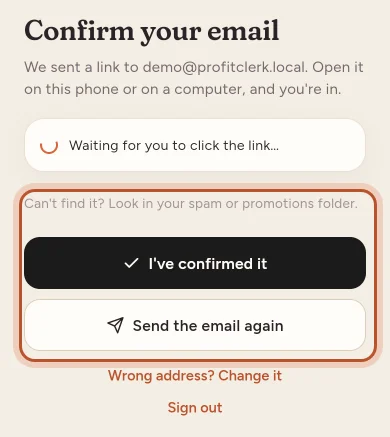
- Confirmation email: tap Send the email again. In the app, the button counts down for 60 seconds before you can send again.
- Password reset: use Forgot your password? again. Only the newest link works, and each link works for 60 minutes.
- Team invitation: ask the person who invited you to send you the link to join themselves.
Wait a few minutes before asking again. Some mail providers hold new mail briefly.
Confirmation email: carry on once it arrives
Open the link on any device: the phone or a computer. In the app, the Confirm your email screen checks by itself every few seconds and when you come back to the app, so it carries straight on once the link is opened. You can also tap I've confirmed it.
If the link says it is not valid or has expired, sign in and ask for a new one.
Team invitations
When the owner invites someone, ProfitClerk shows the link to join and copies it, and also tries to email it. If the email does not arrive, send the link yourself, by message or email. It works for 7 days.
The person should sign in or sign up with the email address that was invited. Signed in with a different address, they see "You are signed in as … Please log in as the invited email … to accept this invitation."
Emails you can switch on or off
Some emails are optional, and only the owner gets them:
- the Weekly profit email (every Monday): More › Notifications › Emails in the app, or Settings on the website
- reminders before tax deadlines and near thresholds: Your tax settings in the tax centre
Account emails, such as password resets, confirmation links and security alerts, are always sent.
Who gets which email
Emails about your plan, payments, eBay sync problems, accounting software and tax go to the workspace owner. Security emails, such as a sign-in from a new device or a password change, go to each person for their own account.
Still nothing?
If you have checked spam and the address, asked again, and waited, contact us from the contact form in More › Contact support or on the website, and say which email you are waiting for. If you cannot sign in at all, see I can't sign in.
Questions people ask
I asked for a password reset but nothing came.
Check spam and promotions folders and that you typed the email you signed up with. For privacy the page says the same thing whether or not an account uses that email, so a typo still looks like it worked.
How do I get the confirmation email sent again?
On the Confirm your email screen, use Send the email again. In the app the button can be pressed again after 60 seconds.
I signed up with the wrong email address.
On the Confirm your email screen, choose Wrong address? Change it, enter the right address and we send the link there instead.
My teammate did not get their invitation email.
Send them the invitation link yourself. When you invite someone, the link to join is shown and copied, and it works for 7 days. They should sign in or sign up with the invited email.
I no longer get the weekly profit email.
The owner can switch it on or off in More › Notifications › Emails in the app, or in Settings on the website. It is included on monthly and yearly plans.
Thanks for telling us.