Listing performance: eBay views and profit per listing
See eBay's impressions, views, click-through and conversion for every live listing beside the profit it made, and which listings ProfitClerk says to fix first.
Listing performance shows every live eBay listing with eBay's own traffic figures for the last 30 days (how often eBay showed it, how often buyers opened it, how often they bought) beside the profit the listing made in the same 30 days. Then it picks one thing to fix for each listing, so you know where to start.
On the website, go to Listing performance in the menu (under Stock & numbers), or select Listing performance on the eBay listings page or on Reports. In the app, go to Stock › Listing performance.
The headline figures
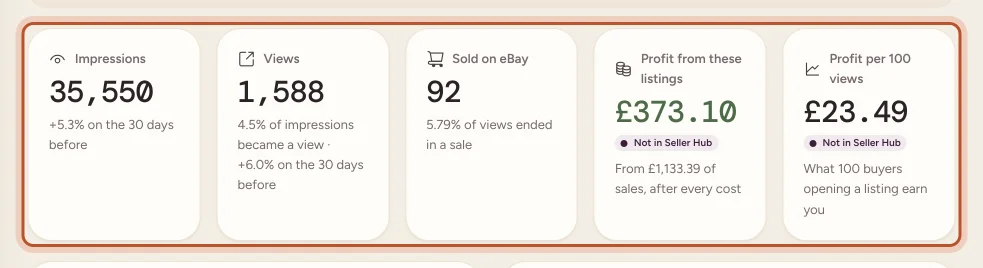
For all the live listings shown, over the last 30 days:
- Impressions: how many times eBay showed your listings, in search results, on your eBay Store and anywhere else on eBay.
- Views: how many times buyers opened a listing. Under it, the share of impressions that became a view (the click-through rate).
- Sold on eBay: how many sales eBay counted, and the share of views that ended in a sale (the conversion rate).
- Profit from these listings: what their sales made you after every eBay fee, the postage label, the item cost and refunds, from your synced orders.
- Profit per 100 views: what 100 buyers opening a listing earn you. It needs at least 20 views to mean anything, so listings with fewer have none.
The last two are marked Not in Seller Hub: eBay can't work them out, because it doesn't know what your stock cost you.
When you have 30 days of figures before these, each headline also shows how it changed against the 30 days before.
From impression to sale, and where views came from
From impression to sale shows where buyers drop off: how many were shown a listing, how many opened it and how many bought.
Where views came from splits views by how buyers reached your listings: eBay search, Your eBay Store, Other eBay pages, Outside eBay (Google, social media and other websites) and Direct (saved or typed links).
The chart
Impressions, views and profit by day covers the last 90 days: impressions and views as lines, and the profit your sales made each day as bars. Use it to see whether a change you made on eBay moved anything.
What to fix first
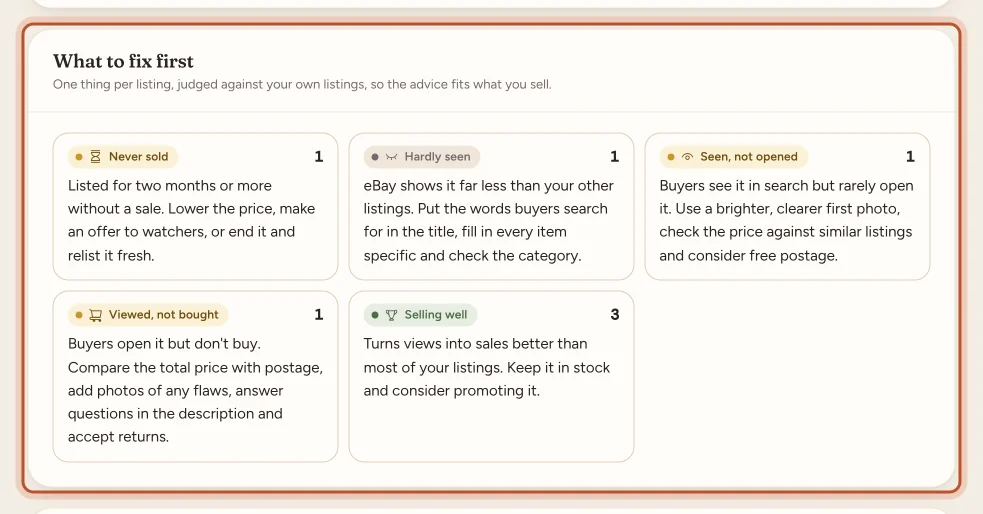
Each listing gets at most one heading, worked out by comparing it with your own other listings, not with other sellers. Select a heading to see only those listings.
| Heading | What it means | What to try |
|---|---|---|
| Sells at a loss | Its sales lost money in the last 30 days after fees, postage and the item cost. | Raise the price, charge for postage or stop restocking it. |
| Never sold | Listed for 60 days or more without a single sale. | Lower the price, send an offer to watchers, or end it and list it again. |
| Hardly seen | eBay showed it far less than your typical listing: under a quarter of its impressions. | Put the words buyers search for in the title, fill in every item specific and check the category. |
| Seen, not opened | Shown at least 200 times, but opened less than half as often as your typical listing. | Use a brighter, clearer first photo, check the price against similar listings and consider free postage. |
| Viewed, not bought | Opened at least 20 times in 30 days with no sale. | Compare the total price including postage, add photos of any flaws, answer questions in the description and accept returns. |
| Selling well | At least two sales, and turns views into sales at least half as well again as your typical listing. | Keep it in stock and consider promoting it. |
Listings younger than a week are not judged on their traffic yet. For more on the most common case, see eBay listing gets views but no sales.
The listings table
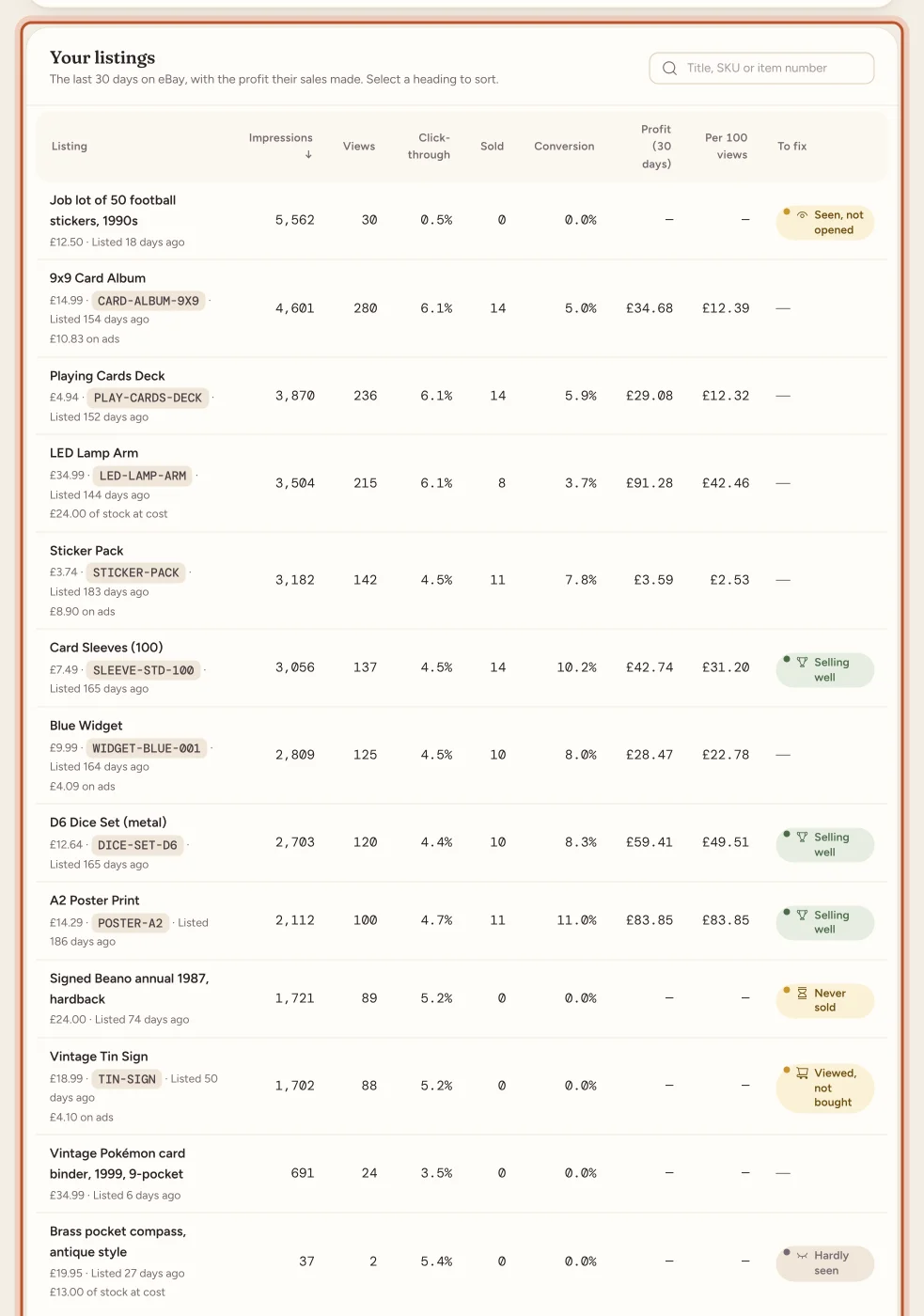
Each row is one live listing, with its title, SKUs, item number and price, how long it has been listed and how many are available. Then:
- Impressions, Views and Click-through;
- Sold and Conversion;
- Profit (30 days) and Per 100 views;
- what it spent on ads and the stock waiting on it at cost, when there is any;
- To fix, with the advice for that heading.
Select a column heading to sort by it, and select it again to reverse the order. Search by title, SKU or item number. If you have more than one eBay account or sell on more than one eBay site, pick one at the top. Select a title to open the listing on eBay.
Export CSV downloads every listing shown, with each view source as its own column, for your own spreadsheets.
When figures come in
eBay updates its traffic figures once a day. After you connect an eBay account, its listings' figures arrive within a few hours; after that they refresh daily. The time of the last update is shown at the top of the page.
eBay gives traffic figures for listings on its US (including eBay Motors), UK, German, Australian, French, Italian and Spanish sites. Listings on other eBay sites show their sales and profit, with eBay gives no figures for this site in place of their traffic.
Connect again to see listing traffic
eBay asks you for a separate, read-only permission to read traffic figures. An eBay account connected before ProfitClerk asked for it shows Connect again to see listing traffic. The workspace owner selects Connect again and signs in with eBay once; nothing else about the account changes. See eBay permissions and security.
How many listings your plan covers
Each plan covers a number of live listings. If you list more, the listings already tracked keep updating, and the page says how many were left out. Ended listings don't count. Your plan's limit and how many you use are on Billing (in the app, More › Your plan). See Plans and what each one includes.
Questions people ask
Are these the same figures as Seller Hub's traffic report?
Yes. Impressions, views, click-through, sales and conversion come from eBay's own traffic report for the last 30 days. ProfitClerk adds the profit each listing made, which eBay doesn't show.
How often are the figures updated?
eBay updates its traffic figures once a day, usually for the day before. ProfitClerk reads them through the day, so they are never more than about a day behind eBay's.
Why does a listing say "No figures yet"?
eBay's figures for it haven't been read yet. New listings and newly connected accounts fill in within a few hours.
Why does a listing say "eBay gives no figures for this site"?
eBay only gives traffic figures for listings on some of its sites. Listings on other sites still show their sales and profit.
Does an ended listing count towards my plan?
No. Only live listings count. When a listing ends it drops off the page and frees its place.
Thanks for telling us.